
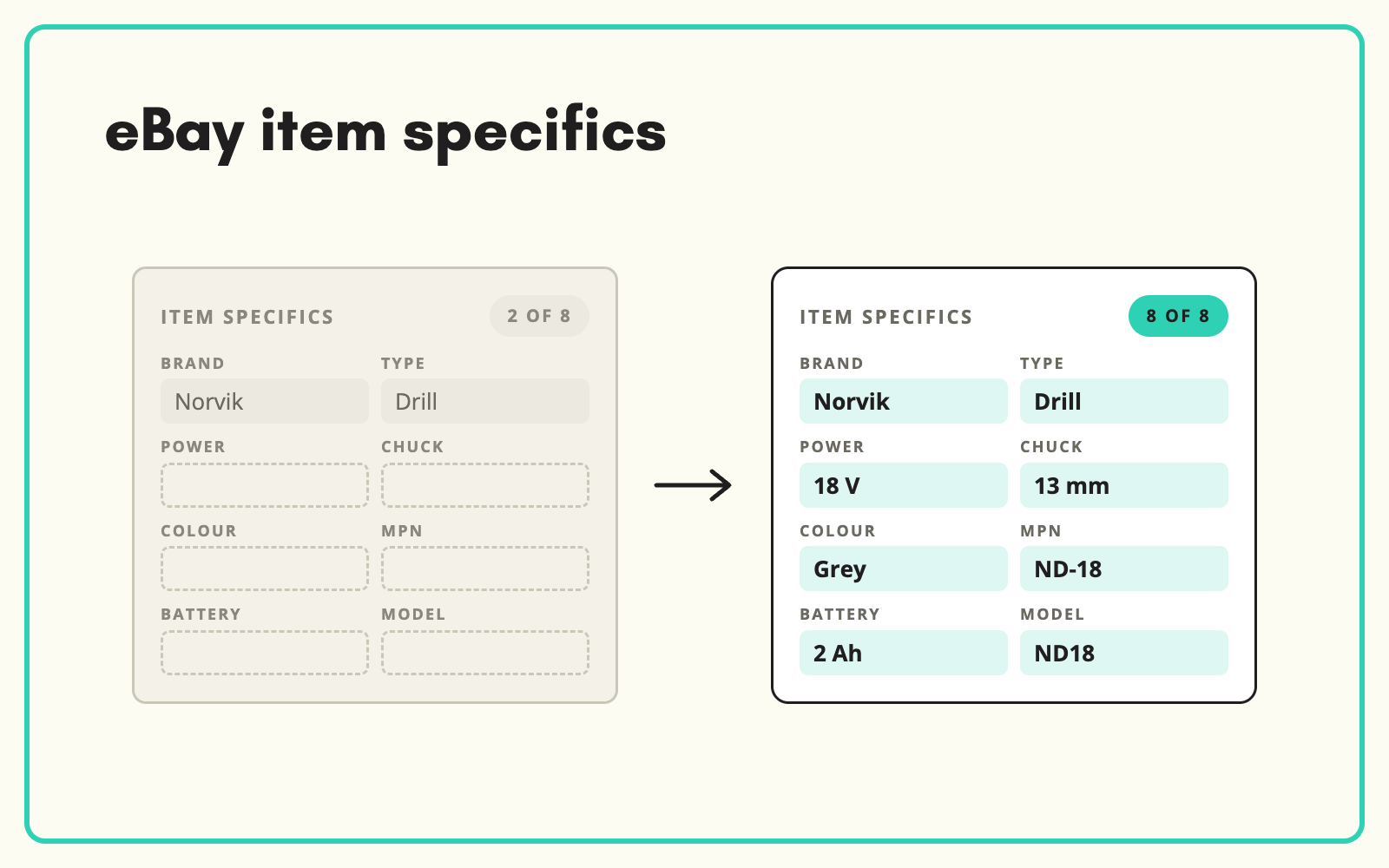
eBay item specifics are the name and value pairs, such as Brand, Type, Voltage and Colour, that describe a listing in a structured way. eBay uses them to show listings in search filters and to match buyer searches, so a listing with gaps is shown less. SKULaunch fills the item specifics each eBay category expects from your product data and real sources, so listings are complete when they go live.
The problem
Item specifics are tedious to complete by hand. Every eBay category has its own set, the set changes over time, and many specifics have a list of suggested values that your own data does not use. Sellers fill the required ones to get the listing live and skip the rest. The listing goes up, but it is missing from the filters buyers click on the left of the search results.
The root cause is rarely eBay. It is the product data behind the listing. If your catalogue does not hold voltage, power source or included items as separate attributes, nobody can map them to eBay, and every listing becomes a manual job. For parts sellers, missing compatibility details mean buyers cannot confirm fit and buy elsewhere.
Before and after
An illustrative example from a power tool retailer's eBay listings.
Before: the eBay listing
Brand and MPN set. Type, Power Source, Voltage, Features, Model and Item Included left blank. Title carries the voltage, but the specifics do not, so the listing does not appear when a buyer filters by 18 V.
After: from SKULaunch
- Type: Combi Drill. Power Source: Battery. Voltage: 18 V. Model filled from the manufacturer's data
- Recommended specifics such as Features, Chuck Size and Item Included completed from the datasheet
- Values matched to eBay's suggested options where they exist, so "Cordless" in your data becomes the value eBay expects
- Body only or kit stated clearly, because buyers filter on it
- Ready to list or update in bulk
How it works in SKULaunch
- Set up an eBay channel. Map eBay item specifics to your own attributes for each category you sell in.
- Measure. See which products lack required and recommended specifics, category by category.
- Fill. Enrich missing attributes from datasheets, PDFs, images and manufacturer websites, then map values to eBay's options.
- Export. Produce listing data for your eBay route, whether that is a file upload, a listing tool or your ecommerce platform. Confirm the set-up for your account with us.
Required, recommended and optional eBay item specifics
eBay groups item specifics by importance for each category. Required specifics must be present to list. Recommended specifics are the ones eBay suggests because buyers use them to search and filter. Optional specifics add detail. eBay publishes the specifics for each category, along with suggested values, and those lists change, so a set you mapped last year may be out of date.
Required specifics get a listing live. Recommended ones get it found. Buyers narrow results with them, and eBay uses them to match searches to listings. Treat the recommended set for your top categories as required in your own data, and the quality gap with competing sellers closes quickly.
Rules that keep item specifics clean
- Hold specifics as attributes, not in the title. "18V" in a title helps search. Voltage as a field helps filters. You need both, and the title should be built from the field.
- Use eBay's suggested values where they fit. A custom value that means the same thing may not appear under the filter buyers use.
- One value per specific unless multiple are allowed. Do not pack three features into one comma separated string if eBay accepts them separately.
- Keep units consistent. 18 V, not 18v on one listing and 18 Volt on the next.
- Fill product identifiers properly. Brand, MPN and a valid GTIN help eBay match your listing to its product catalogue. Only use "Does not apply" when it is true.
- Map once per category, reuse for every listing. The mapping lives in your channel set-up, not in someone's head.
Common mistakes
The most common mistake is fixing listings on eBay rather than fixing the data. It works for one listing and has to be repeated for every new one. The second is mapping your own category tree to eBay one to one. eBay's categories are often more granular, so one of your categories may split across several eBay categories with different specifics. The third is treating variation listings as separate products. In a multi-variation listing, the option values such as Size or Colour must be consistent across every variation, which is a data modelling problem before it is a listing problem.
What changes
Listings show in more filters and searches, buyers can confirm the details that decide a purchase, and new listings go up complete because the attributes already exist in your data.
Common questions
What are item specifics on eBay?
They are structured details about a listing, such as brand, size, colour or voltage, entered as name and value pairs. eBay uses them for search filters and to match listings to searches.
How do I find the required item specifics for an eBay category?
eBay shows them when you create a listing in that category, and publishes them for developers and listing tools. In SKULaunch they are mapped to your attributes per category, so completeness is measured against them.
Do missing item specifics affect search ranking?
They affect visibility. A listing missing a specific will not appear when a buyer filters on it, and eBay uses specifics when matching listings to searches.
Does this work for parts compatibility?
Yes, alongside fitment data. Item specifics describe the part. Compatibility describes the vehicles it fits, and both come from your product data.
Can we update existing listings?
Yes. Export updated data for existing items and apply it through your listing route.
Is there a direct eBay connector?
The route depends on how you list today. Confirm the best option for your account with us.
More on channel-specific attributes, mapping parts to vehicle applications, Amazon listings with missing attributes, GTIN, EAN and MPN and marketplace syndication.

