Stop putting off
your taxonomy.
AI builds it in minutes.

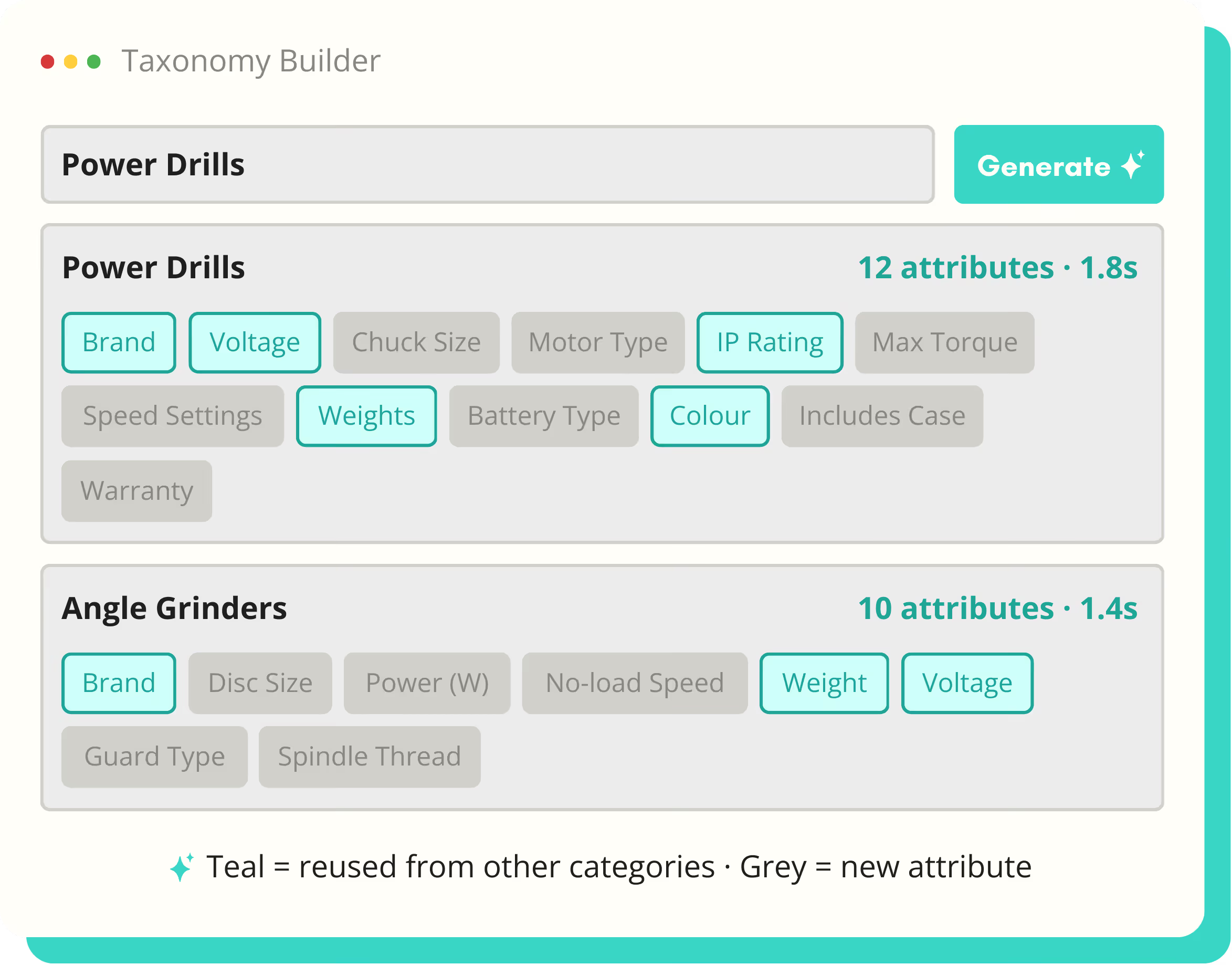
Type a product category. Get a complete attribute schema — required fields, data types, accepted values — in under two minutes. Then reuse, extend, and refine as your catalogue grows.
The Notes App for Power Users - Techbeta X Webflow Template
Screenshot of a Taxonomy Builder tool showing attributes for Power Drills and Angle Grinders, with teal highlighting reused attributes and grey for new attributes.
100%
Tasks completion rate
10M+
Capital raised

<2

Minutes to build a schema

50+

Attributes suggested per category

Any

Product category, any industry
How it works

The schema problem. Finally solved.

Defining what to collect has always been the step everyone avoids. AI Schema Builder removes the blockers — workshops, spreadsheets, and six-week discovery projects.

🏗️

AI Schema Builder

Type a category name. AI generates a complete attribute schema — field names, data types, units, and accepted values — drawn from 50,000+ industry products.

♻️

Attribute reuse

Common attributes like Brand, Voltage, and Weight are shared across categories. Change the definition once and it updates everywhere — no schema drift.

Validation rules

Set accepted values, units, required fields, and format constraints per attribute. Enforced at onboarding, import, and enrichment — before bad data gets in.

AI SCHEMA BUILDER

Six weeks of workshops. Replaced by two minutes of typing.

The traditional approach to taxonomy design involves stakeholder workshops, spreadsheet templates, and months of iteration before a single product is onboarded. AI Schema Builder generates a complete, best-practice schema for any product category instantly — then you refine it, not build it from scratch.

Blue check mark symbol indicating completion or approval.
Type a category — get field names, types, units, and accepted values
Blue check mark symbol indicating completion or approval.
Required vs optional fields suggested by default
Blue check mark symbol indicating completion or approval.
Edit, add, or remove any suggested attribute
Blue check mark symbol indicating completion or approval.
Generate sub-category schemas that inherit from parent
Schema detail for Voltage attribute showing name as Voltage, data type Number, unit V (volts), accepted values 10.8, 12, 14.4, 18, 36, 54, required Yes, used in 14 categories.
ATTRIBUTE REUSE

Define once. Use everywhere. Change once. Updates everywhere.

In most PIM setups, the same attribute exists twelve times with twelve different names, units, and accepted values. SKU Launch uses a shared attribute library — one definition per concept, reused across every category that needs it.

Blue check mark symbol indicating completion or approval.
Shared attribute library visible across all categories
Blue check mark symbol indicating completion or approval.
Reuse attributes across categories with a single click
Blue check mark symbol indicating completion or approval.
Update a shared attribute — changes propagate everywhere
Blue check mark symbol indicating completion or approval.
Override unit or accepted values at category level if needed
Blue check mark symbol indicating completion or approval.
See which categories use each attribute at a glance
Attribute library listing shared definitions for Voltage, Brand, IP Rating, and Weight with their data types, usage notes, and number of categories used.
REVIEW AND APPROVAL WORKFLOW

Nothing publishes without a human approving it.

AI generates the copy. Your team reviews it. SKU Launch never auto-publishes. Every piece of generated content sits in a review queue until someone on your team approves, edits, or rejects it.

Blue check mark symbol indicating completion or approval.
Inline editing — edit the draft directly without leaving the queue
Blue check mark symbol indicating completion or approval.
Searches multiple authoritative sources per product
Blue check mark symbol indicating completion or approval.
Cites the source URL for every extracted value
Blue check mark symbol indicating completion or approval.
Ideal for catalogue gaps, new SKUs, or hard-to-source specs
Blue check mark symbol indicating completion or approval.
Confidence scoring flags low-certainty attributes for review
Review queue showing three tools: Makita DHP484Z pending review with options to approve, edit, or regenerate; Bosch GSB 18V-55 approved; DeWalt DCD796 pending review.
also in enricment & content

Explore the full platform

Enrichment & Content is one of three pillars.

DATA STRUCTURE

Schema & Attributes

You're here.

DATA STRUCTURE

Mapping & Normalisation

Normalised data scores higher - fewer format errors, fewer missing values.

Explore →
DATA STRUCTURE

Product Data Quality

After normalisation, quality scoring tells you what's ready to publish.

Explore →
SOURCE ONBOARDING

Imports & Spreadsheets

Normalisation kicks in the moment a spreadsheet is uploaded - messy columns map automatically.

Explore →
ENRICHMENT & CONTENT

Content Generation

Normalised attribute values produce more accurate, consistent product descriptions.

Explore →

Build your first schema in the demo

Book 30 minutes. We'll generate a schema for your product categories live — and show you how it connects to onboarding and enrichment.

© 2026 SKU Launch Ltd. All rights reserved.
Built for e-commerce teams who are done doing it by hand.