

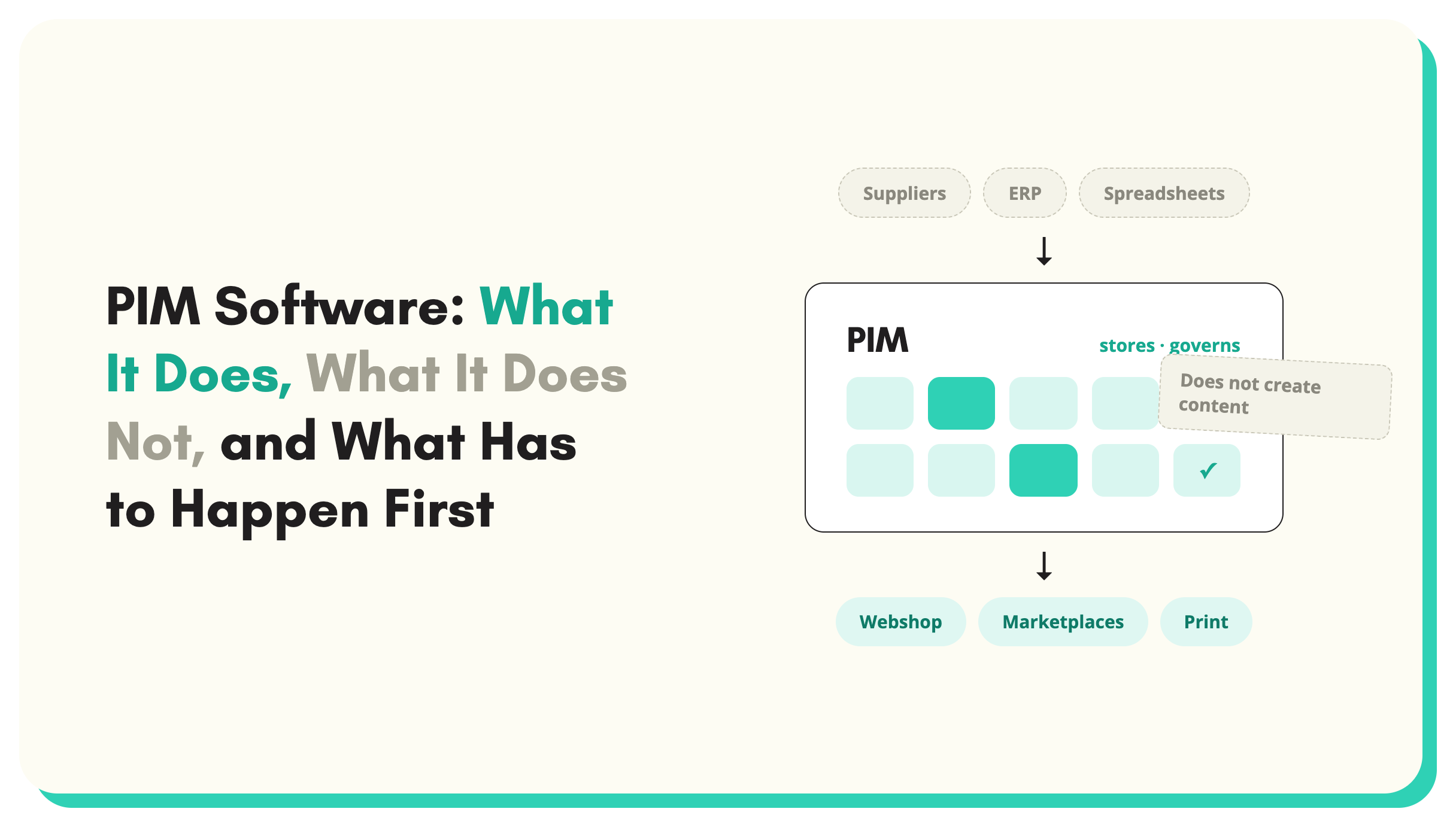
What PIM software does and does not do, when you need one, the five alternatives, and what lightweight PIM must keep.
Most searches for PIM software start from the same assumption: the product data is a mess, so the fix is a system to manage it. The assumption is half right. A PIM brings order, governance and a single place to look. What it does not bring is the data itself. Buy PIM software with an incomplete catalogue and you get the same incomplete catalogue, behind better screens, with an implementation invoice attached. The pattern is common enough to have a name: the empty PIM. This guide covers what PIM software does and does not do, how to tell whether you need one yet, the five alternatives that work, what "lightweight" actually means, and what to put in place before you sign.
What PIM software actually does
A PIM system is a system of record for product content. It stores product records in a structured schema, controls who can change what, measures completeness against rules you define, and syndicates approved records to channels: your webshop, marketplaces, print, retail partners.
Done well, that is worth a lot. Teams stop maintaining private spreadsheets. Channels stop receiving different versions of the same product. Completeness becomes a number instead of an argument. For a catalogue in the tens of thousands of SKUs selling through more than a couple of channels, a system of record is the right architecture, and the mainstream tools (Akeneo, inriver, Plytix, Salsify and the rest) are mature. The boundaries between PIM and its neighbours are covered in PIM vs DAM vs MDM.
What PIM software does not do
A PIM manages the data you put into it. Three jobs sit outside that sentence, and they are usually the jobs that hurt.
It does not create attributes. A supplier spreadsheet with the voltage buried in a description paragraph enters the PIM as a description paragraph. The PIM will faithfully report the voltage field as empty, forever, until someone or something extracts the value and puts it there.
It does not clean supplier files. Two hundred suppliers means two hundred column layouts, unit conventions and category structures. Mapping those onto your schema is load work that happens before the PIM, for every supplier, every time their range changes.
It does not write content. Descriptions, titles and feature bullets are fields the PIM holds, not fields it fills.
The result shows up around six months after go-live: a completeness dashboard stuck at 40 per cent, and the team quietly back in spreadsheets doing the upstream work the project plan never included. The failure is almost never the PIM system itself. It is the assumption that structure creates content.
How to tell whether you need PIM software yet
The honest signals are catalogue size, channel count and team size. More than two sales channels, more than roughly ten thousand SKUs, or more than one team editing product data, and a system of record starts earning its licence fee. Below those thresholds, your commerce platform's own catalogue plus a disciplined process usually does the job.
The sharper question is not whether but when. A PIM bought before the data exists becomes an expensive way to discover the data does not exist. Product data enrichment vs PIM covers the sequencing in detail, but the short version is: the system of record is the destination, not the fix. Before comparing tools, answer one question: where will complete product data come from? If it already exists, clean, in your systems, pick the cheapest structure that holds it. If it comes from suppliers in whatever state they send it, every storage-only option, traditional PIM included, inherits the same gap.
The five alternatives to PIM software
Most searches for PIM alternatives are not really asking for a different PIM. They are asking whether the six-month implementation, the integration partner and the licence fee are necessary to get the thing a PIM promises: one clean, complete record per product. For a lot of catalogues the answer is no. Five options cover the ground.
1. A disciplined spreadsheet
Below a few thousand SKUs with stable suppliers, a well-run spreadsheet is a legitimate system of record: one master file, one owner, defined columns per category, and a hard rule that channel exports are generated from the master rather than edited separately. It breaks on variants, on a second regular editor, and on the day a second sales channel needs its own version of the truth. The switching rules are in PIM vs spreadsheet.
2. Your ecommerce platform's catalogue
Shopify, BigCommerce and Magento each carry a built-in product catalogue, and for a single-channel range it can be the only catalogue you need. Metafields and custom attributes cover a surprising amount of structure. The limits arrive with the second channel, with technical categories that need thirty attributes with units, and with supplier intake: the platform catalogue has no opinion about the two hundred differently shaped files your suppliers send. Stores that have outgrown the admin are covered in PIM for Shopify.
3. A lightweight PIM
Tools such as Plytix serve teams that want proper structure without the enterprise machinery: published pricing, self-serve setup, built-in digital asset management, and a data model that covers most mid-sized catalogues. The trade is that a lightweight PIM still expects clean data in. It organises what you give it; it does not fix what your suppliers send. What "lightweight" should and should not drop is covered in the next section.
4. An enrichment platform with a built-in PIM layer
The newest option, and for supplier-fed catalogues the one shaped like the actual work. SKULaunch reads supplier PDFs, spreadsheets, images and URLs, extracts and normalises the attributes, then holds the finished record in its own built-in PIM layer: one governed record per SKU, variants modelled properly, AI-suggested taxonomies and attribute schemas, and pushes out to your channels. Setup is self-service and takes days rather than months. Mole Valley Farmers ran 35,000 SKUs through that pipeline in three weeks, written up in the Mole Valley Farmers case study. Best fit: retailers and distributors whose real problem is that product data arrives messy, not that clean data lacks a home.
5. An open source PIM
Akeneo Community Edition is free to licence and capable. The cost moves rather than disappears: hosting, upgrades, extensions and the developer time to run all three. For a team with engineering capacity and a preference for owning its stack, it is a serious option. For a team without one, the free licence is the cheapest part of an expensive system.
Match the option to the shape of the catalogue. Under a few thousand SKUs on one channel: the spreadsheet or the platform catalogue, run with discipline. A growing catalogue with reasonably clean data and a need for structure: a lightweight PIM. A supplier-fed catalogue where the data arrives incomplete, in technical categories, at volume: the enrichment platform with the built-in PIM layer, because acquiring and structuring the data is most of the job. Engineering capacity and a composable stack: open source.
What lightweight PIM software should and should not leave out
A lightweight PIM is a product information system cut down to the parts most teams use every day. The question is which parts of the big system were weight, and which were structure.
Weight, safely dropped: multi-step approval workflows, because when two or three people own the catalogue a change does not need a committee; print channel management, because the catalogue that goes to print is a different business problem from the one that goes to Shopify; multi-domain governance, the MDM-grade machinery for reconciling product, customer and supplier masters across a dozen systems, because most mid-sized businesses have three systems, not thirty; and the partner ecosystem, because a system you can configure yourself does not need one.
Structure, never dropped: one central record per product, so every channel and every colleague reads from the same place; variant modelling, so a product with twelve sizes is one parent and twelve children, not twelve repeated rows; a schema per category with types, units and accepted values, so "18V", "18 V" and "Eighteen volt" cannot coexist; completeness measurement by category, so you know which records are fit to publish before the storefront tells you; and channel outputs generated from the record rather than exported and hand-edited. A tool that drops any of these is not lightweight, it is a spreadsheet with a login screen.
The self-service test. The sharpest filter is whether you can set the system up yourself. Take your worst category, import a real supplier file, model one variant family, define the schema, and publish to one channel, inside a trial, without a call. If the vendor's answer is a demo booking and an implementation quote, the system is not self-service, whatever the label says. The licence fee is rarely the real cost of a PIM. The implementation is, and a system you configure yourself in days removes the largest line from the budget.
A short checklist for any PIM that calls itself lightweight, simple or affordable:
- It imports the files your suppliers actually send, not just clean CSVs.
- Variants are modelled as parent and children, on any axis, without rebuilding the product.
- Schemas are per category, with types, units and accepted values enforced on import.
- Completeness is measured by category, not as one flattering site-wide number.
- Each channel gets its own output from one record, generated rather than maintained.
- Pricing is published, and the trial does not require a sales call.
- There is an answer to "how does messy supplier data become complete records" that is not "your team".
What to put in place before you buy PIM software
An attribute schema per category. The PIM will ask for one on day one of implementation. Deciding it during implementation is how projects slip. Decide what a complete drill record and a complete paint record look like before the vendor demos start; AI-suggested schemas get a first draft on the table in minutes.
A supplier intake route. Where does new product data arrive, in what format, and who transforms it? If the answer is "email, whatever they send, and one person", the PIM inherits that bottleneck unchanged.
Enrichment capacity. Someone or something has to turn supplier files into complete records at the rate new products arrive. This is the part of product data management that determines whether the PIM fills up or stays empty, and it is a permanent operation, not a migration task.
If your PIM system is already half empty
The reset is upstream, not inside the PIM. Measure completeness per category rather than overall, because an 80 per cent average usually hides categories at 30. Fix the intake route for the worst categories first. Then use extraction to populate the gaps: modern enrichment tools read supplier spreadsheets, PDFs and images, extract attributes against your schema, and push finished records into the PIM.
That is the pattern SKULaunch runs: extraction and classification upstream, enriched records pushed to Akeneo, Plytix or wherever the system of record lives. Bowens Australia filled its existing PIM that way without changing the PIM at all. For teams that need governance without a separate system, the built-in PIM layer removes the two-system question entirely, and a growing share of SKULaunch customers run it as their only PIM.
The wider discipline for distributors, covering intake, enrichment, classification and syndication as one operation, is set out in the guide to product data management for distributors.
Key takeaways
- PIM software stores, governs and syndicates product data. It does not extract, clean or write it.
- The empty PIM is the standard failure mode, and it is a data supply problem, not a software problem.
- You probably need a PIM at multiple channels, tens of thousands of SKUs, or multiple editing teams. Below that, sequence the data work first.
- Five alternatives cover the ground: a disciplined spreadsheet, the ecommerce platform's catalogue, a lightweight PIM, an enrichment platform with a built-in PIM layer, and open source. Choose by where complete data will come from.
- Lightweight can drop approval chains, print pipelines, MDM-grade governance and the partner ecosystem. It cannot drop central records, variant modelling, schema validation or completeness measurement. Apply the self-service test.
- Before buying: a per-category attribute schema, a defined supplier intake route, and enrichment capacity that matches the rate products arrive.
- A half-empty PIM is fixed upstream. Extraction against your schema fills it faster than any amount of manual data entry.
See SKULaunch in action
Watch how we handle AI enrichment, supplier onboarding, and catalogue scale in a live 30-minute demo.


.avif)