
Marketplace syndication that gets
listings live first time.

Every marketplace wants different attributes in different formats. SKULaunch maps your enriched product data to each channel's schema, Amazon, eBay, Mirakl, or any API, and validates every listing before publish so it goes live first time.
The Notes App for Power Users - Techbeta X Webflow Template
SKULaunch supplier product data portal — supplier submission form for Power Tools category showing AI validation in progress
First time
Listings accepted, validated before publish
Any API
Amazon, eBay, Mirakl, and more

3+

Marketplace schemas mapped: Amazon, eBay, Mirakl

1

Enriched record mapped to every channel format

Zero

Listings published without approval
How it works

Everything you need to publish to every marketplace.

Stop reworking rejected listings. Map your enriched data to each channel's schema, validate before you publish, and keep approval in your hands.

📋

Channel Schemas

One enriched record mapped to each marketplace's required attributes and formats.

Pre-Publish Validation

Every listing checked against the target channel's rules before it leaves.

🤖

Category Mapping

Your taxonomy mapped to each marketplace's category tree, with AI suggestions.

🔒

Approvals & Audit

Nothing publishes without sign-off, and every decision is recorded.

🔄

Mirakl & APIs

A direct Mirakl connector, plus formatted pushes to any channel API.

📎

Feeds & Exports

Spreadsheets, BMEcat, and custom feeds for channels without an API.

CHANNEL MAPPING

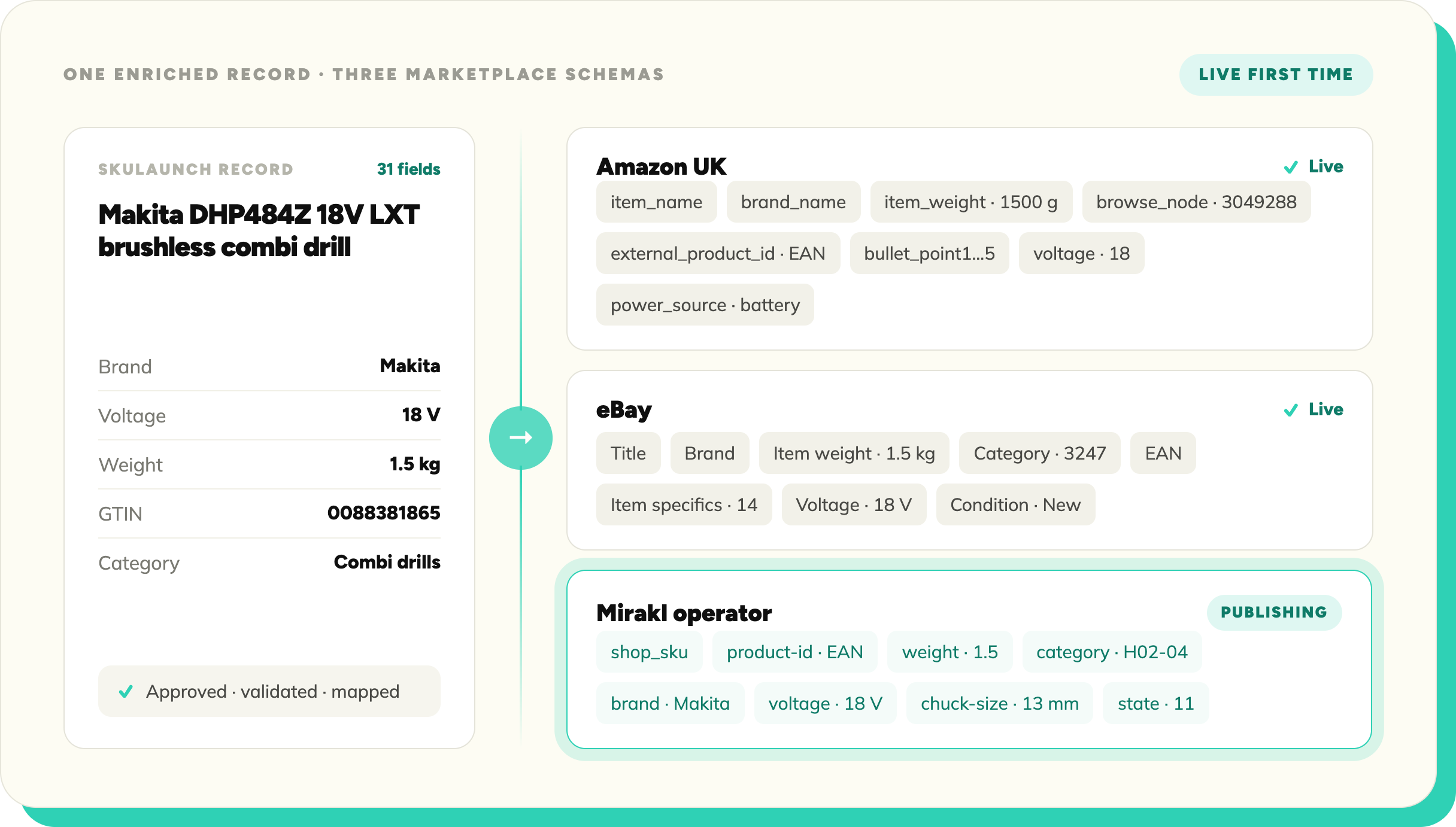
One record. Every marketplace schema.

SKULaunch holds one enriched record per product and maps it to each marketplace's schema at publish time. Amazon, eBay, and Mirakl each get their required attributes, in their format, from the same source data.

Blue check mark symbol indicating completion or approval.
Attributes mapped to each channel's required fields
Blue check mark symbol indicating completion or approval.
Values converted to each channel's accepted formats and units
Blue check mark symbol indicating completion or approval.
Channel-specific fields flagged when missing
Blue check mark symbol indicating completion or approval.
New channels added without reworking source data
Blue check mark symbol indicating completion or approval.
One update flows through to every connected channel
SKULaunch supplier template builder — defining required and optional fields for Power Tools product type
PRE-PUBLISH VALIDATION

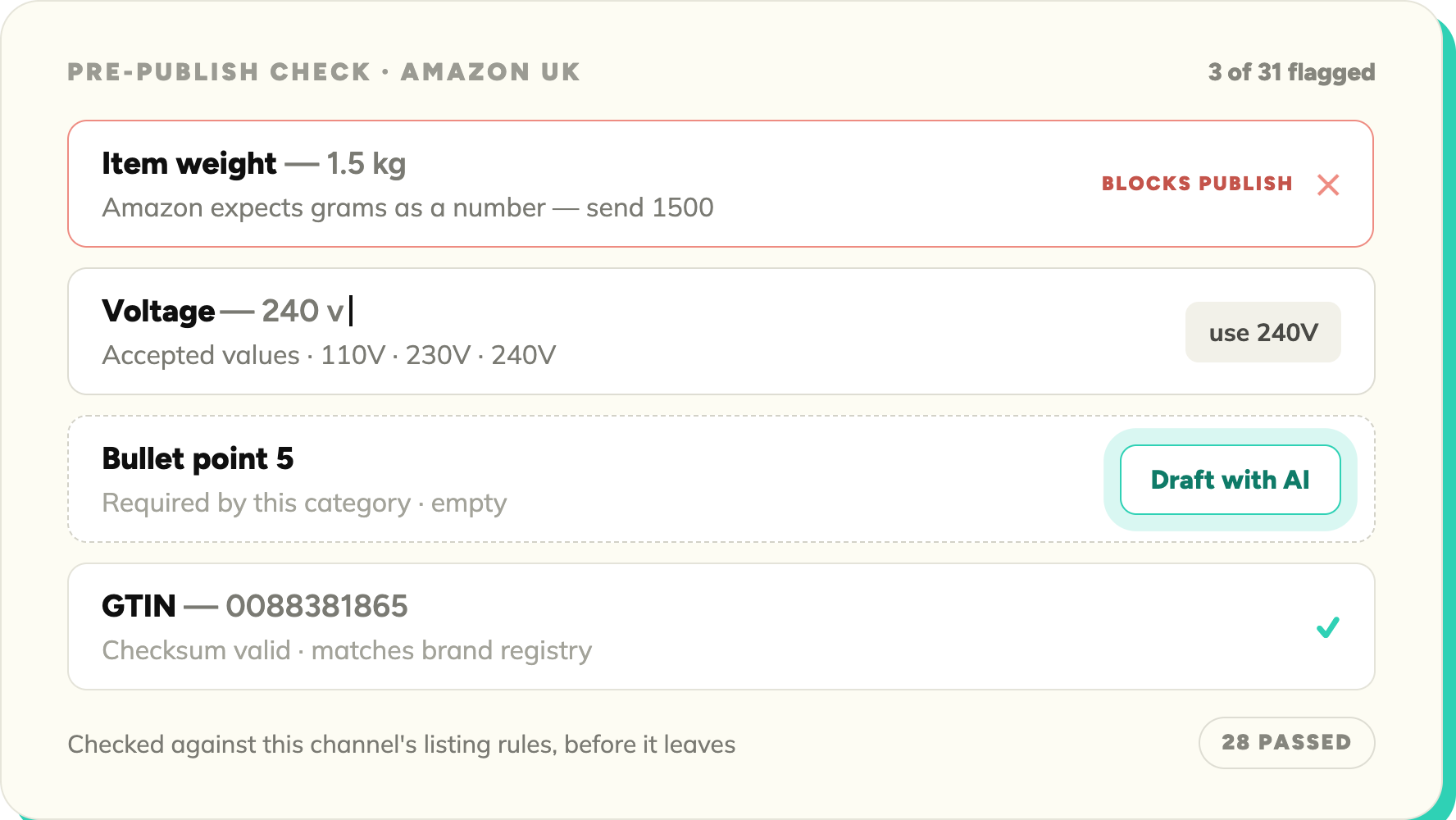
Rejections caught before you submit.

Listings fail when required attributes are missing or formats are wrong. SKULaunch validates every product against the target channel's requirements before it leaves, so the reject-fix-resubmit loop stops.

Blue check mark symbol indicating completion or approval.
Validated against each channel's listing requirements
Blue check mark symbol indicating completion or approval.
Required-field completeness tracked per channel
Blue check mark symbol indicating completion or approval.
AI suggestions for missing or uncertain values
Blue check mark symbol indicating completion or approval.
Errors explained in plain language
Blue check mark symbol indicating completion or approval.
Publishing blocked until critical errors are resolved
SKULaunch AI validation — flagging weight format error and empty required field before supplier submission
APPROVALS & WORKFLOW

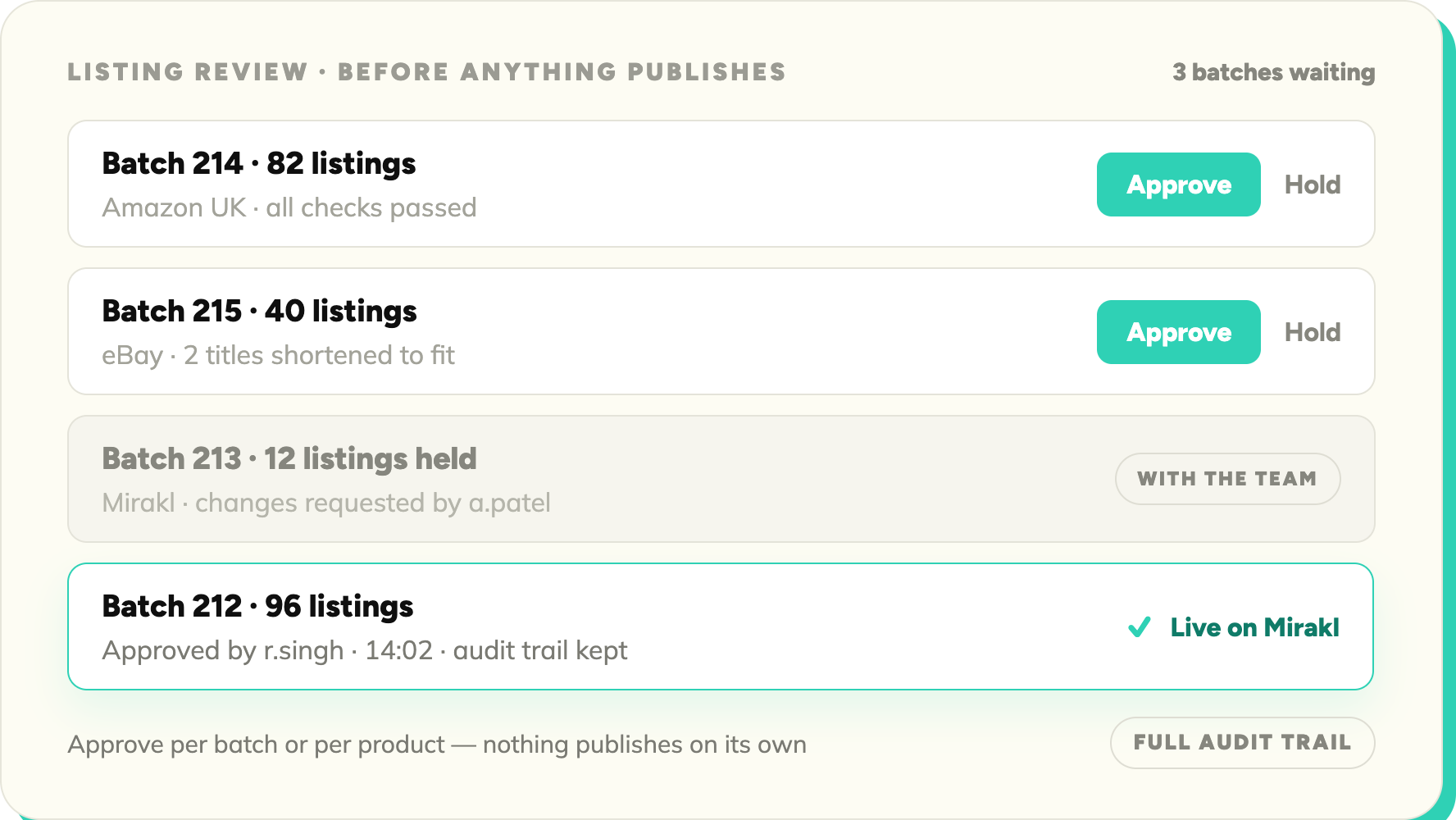
Nothing goes live until you say so.

Every listing batch lands in your review queue before it reaches a channel. Approve what's ready, hold back what isn't, and keep a record of every decision.
Blue check mark symbol indicating completion or approval.
Listings routed to review before publish
Blue check mark symbol indicating completion or approval.
Approve, reject, or hold per product or per batch
Blue check mark symbol indicating completion or approval.
Changes tracked with a full audit trail
Blue check mark symbol indicating completion or approval.
Who approved, when, and what changed, recorded
Blue check mark symbol indicating completion or approval.
Approved listings push to the channel automatically
SKULaunch approvals workflow — supplier submissions pending review with approve, reject, and pending status
CATEGORY MAPPING

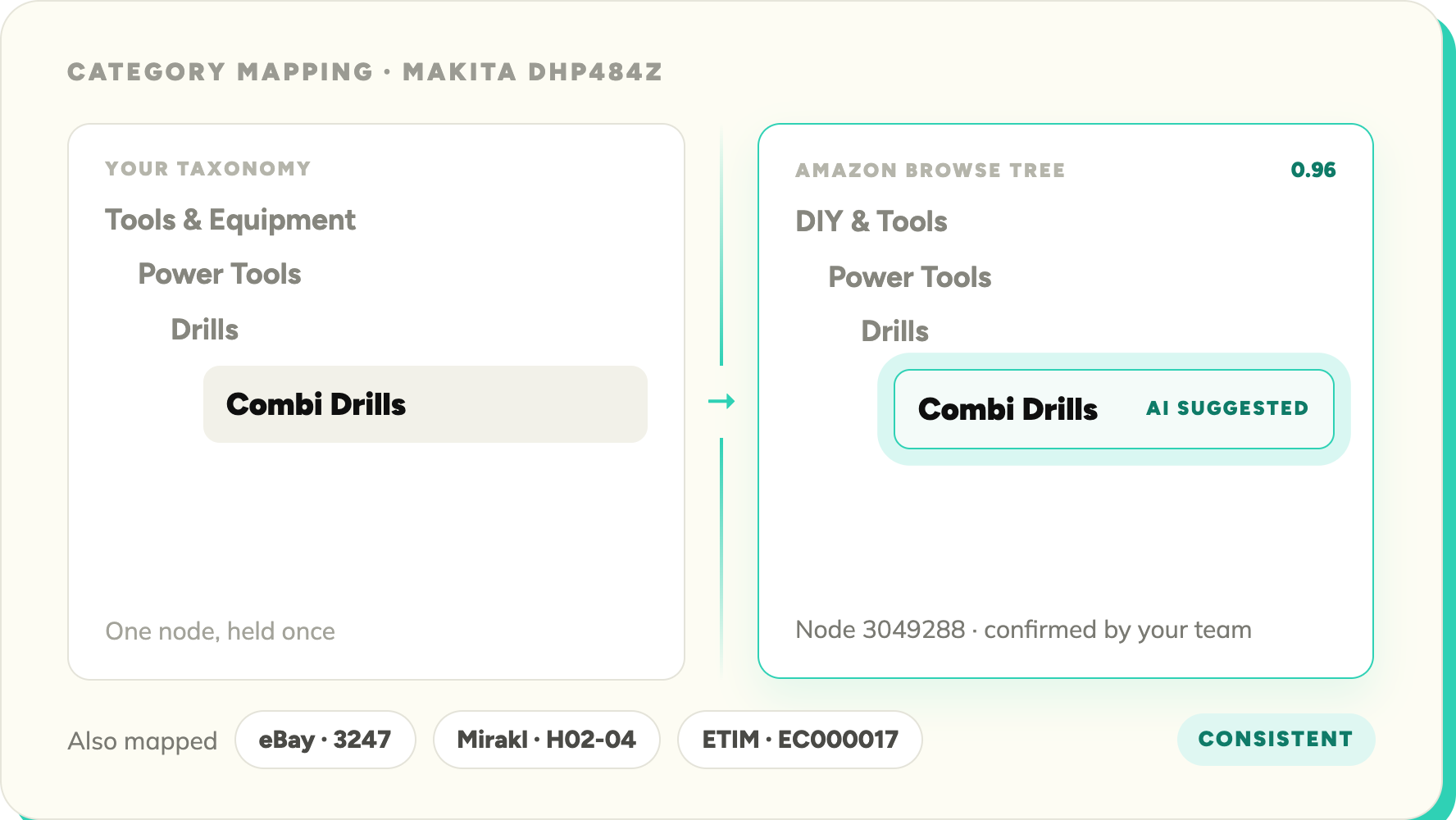
Their category tree. Mapped from yours.

Every marketplace has its own category tree, and listing in the wrong node kills visibility. SKULaunch maps your taxonomy to each channel's tree, with AI suggesting the right node per product.
Blue check mark symbol indicating completion or approval.
Marketplace category trees mapped automatically
Blue check mark symbol indicating completion or approval.
AI-suggested classification per product
Blue check mark symbol indicating completion or approval.
ETIM and GS1 classifications carried across
Blue check mark symbol indicating completion or approval.
Consistent classification across every channel
SKULaunch magic link email — supplier invited to submit product data with no account or password required
MIRAKL & CHANNEL APIS

Direct to Mirakl. Or any API.

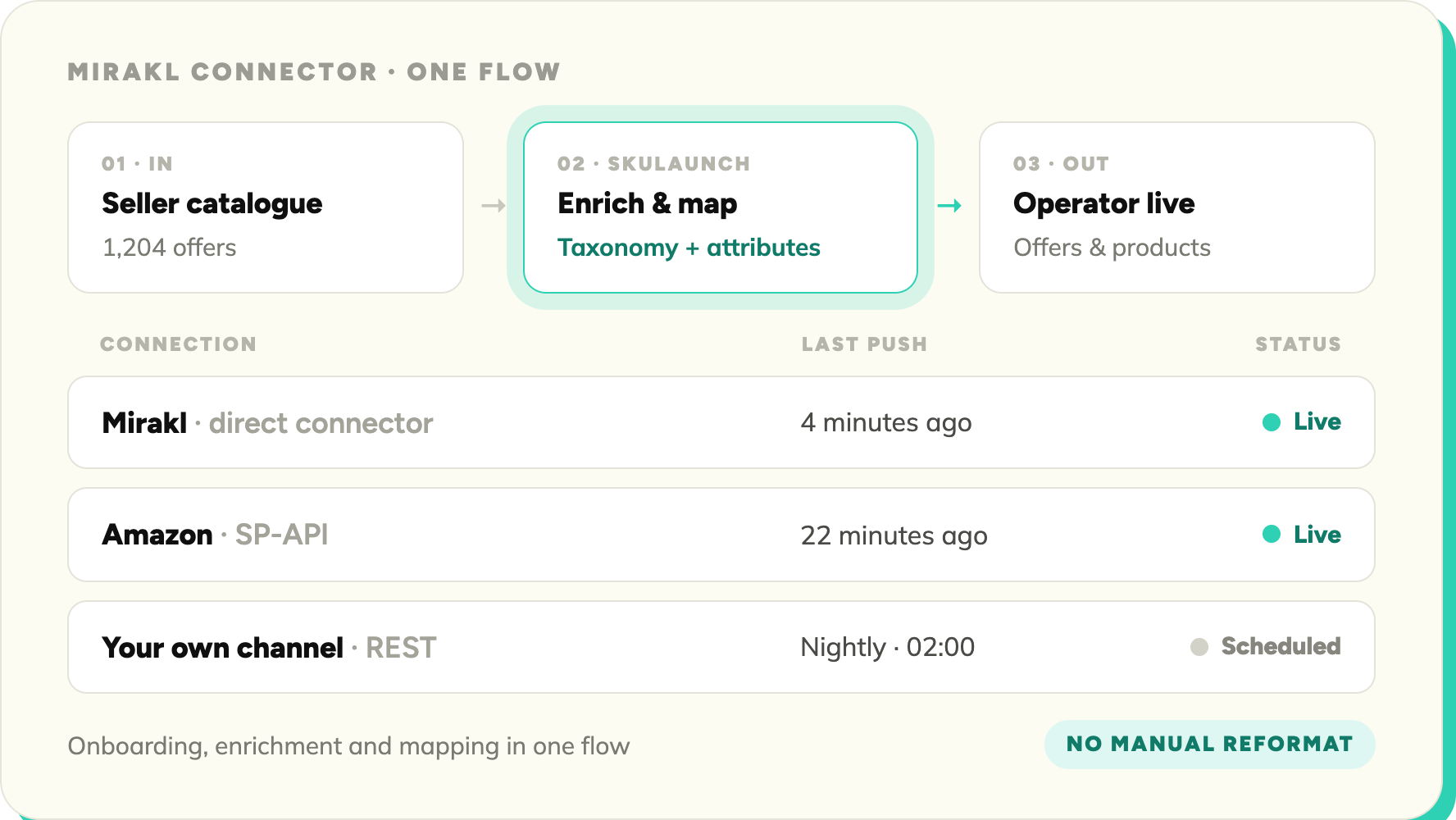
For Mirakl marketplaces, SKULaunch connects directly: seller catalogue onboarding, enrichment, and taxonomy mapping in one flow. For everything else, formatted data pushes through the API.
Blue check mark symbol indicating completion or approval.
Direct Mirakl connector for catalogue onboarding
Blue check mark symbol indicating completion or approval.
Formatted data pushed to any channel via API
Blue check mark symbol indicating completion or approval.
Reduced time-to-market on any Mirakl marketplace
Blue check mark symbol indicating completion or approval.
CSV and spreadsheet export for channels without an API
SKULaunch attribute permissions — setting edit, view, and hidden access per field per supplier
FEEDS & EXPORTS

No API? Export it anyway.

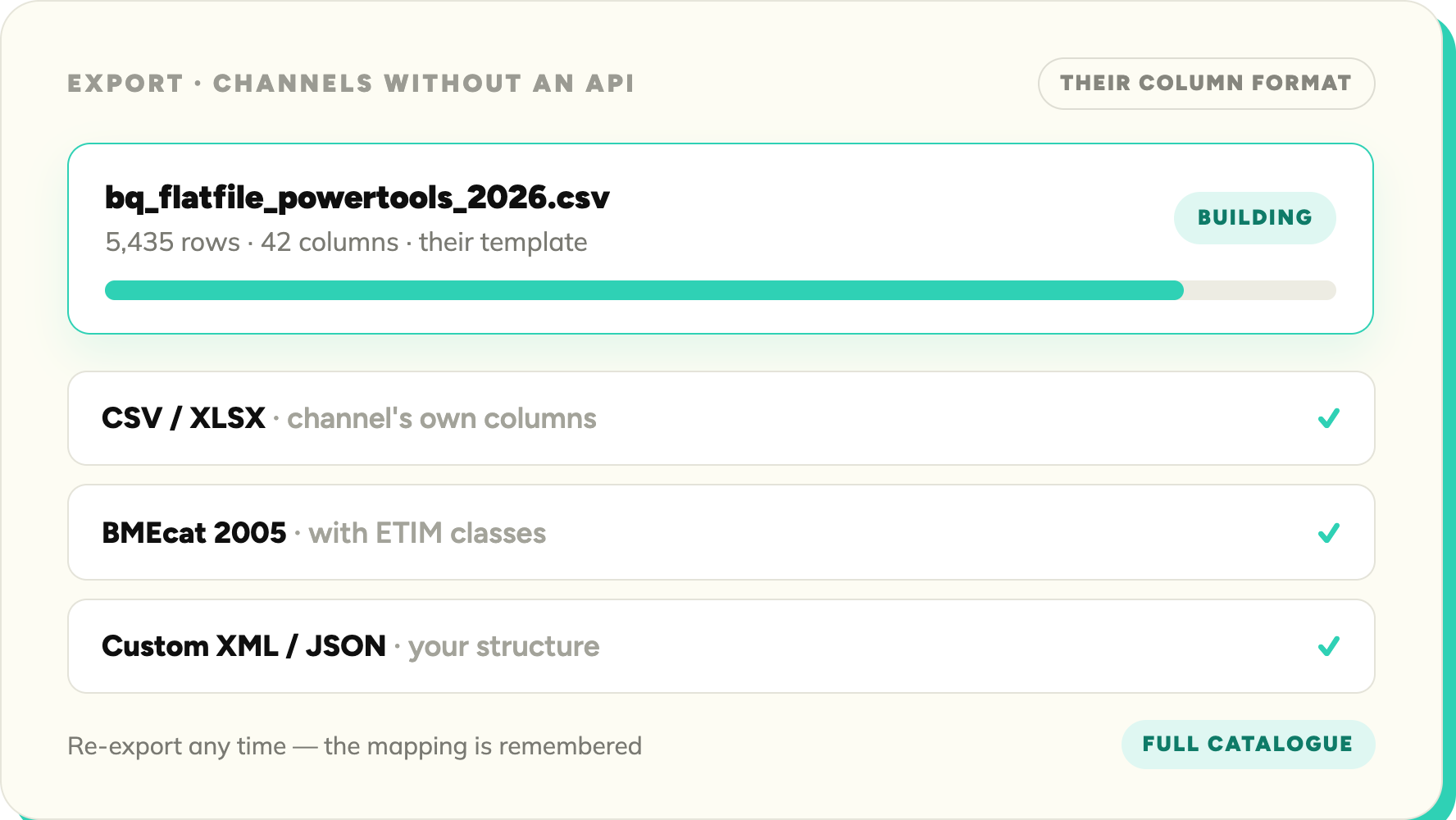
Not every channel takes an API connection. SKULaunch exports your enriched catalogue in whatever shape the channel needs: spreadsheets in their column format, standards-based feeds, or custom structures.
Blue check mark symbol indicating completion or approval.
CSV and spreadsheet export in the channel's format
Blue check mark symbol indicating completion or approval.
BMEcat and standards-based feeds
Blue check mark symbol indicating completion or approval.
Custom data feed structures
Blue check mark symbol indicating completion or approval.
Bulk export across the full catalogue
Blue check mark symbol indicating completion or approval.
Re-export any time as data improves
SKULaunch line card upload — AI mapping supplier columns to schema with 1,181 records ready and 62 issues flagged
also in SKULAUNCH

Explore the full platform

Marketplace Syndication is one piece. See what surrounds it.

PUBLISH & SYNDICATE

Marketplace Syndication

You're here.

PUBLISH & SYNDICATE

eCommerce Sync

Enrich, normalise, and validate product data before it syncs to your storefront.

Explore →
PUBLISH & SYNDICATE

Integrations

Every PIM, commerce platform, and marketplace SKULaunch connects to.

Explore →
DATA STRUCTURE

Product Data Quality

Completeness scoring and publish thresholds before anything goes live.

Explore →
Data structure

Mapping & Normalisation

Units, naming, and values standardised across every source.

Explore →

Stop reworking rejected listings.

Book a demo and we'll map your catalogue to a marketplace schema live, in under 30 minutes.

© 2026 SKU Launch Ltd. All rights reserved.
Built for e-commerce teams who are done doing it by hand.