

The NPI process from range sign-off to product live: ten stages, owners, where the weeks go, a 150-SKU worked example and the metrics that matter.
New product introduction (NPI) in retail and distribution is the process that takes a product from range sign-off to live and buyable on every channel. It covers supplier set-up, data collection, enrichment, imagery, approval, system set-up and publishing. Most of its elapsed time is not spent on any of those tasks. It is spent waiting for supplier data and fixing it.
In manufacturing, NPI means something else: the engineering process that moves a new design into volume production, covering prototypes, tooling and production ramp-up. That process is out of scope here. This guide covers NPI as retailers and distributors run it, from the buying decision to the product page.
What the new product introduction process covers
A retail or distribution NPI process has to answer a handful of questions for every new SKU:
- Is the product approved, and on what commercial terms?
- Is the supplier set up to trade and to supply data?
- Is the product record complete, accurate and in your structure?
- Does it have the images, documents and compliance information each channel needs?
- Is it set up in the ERP to be bought, stocked and sold?
- Is it live on the website, marketplaces and feeds on the planned date, and does it work there?
Teams often see NPI as a buying process with a data step on the end. In practice the data steps take the most elapsed time. They are also where launch dates slip.
The 10 stages of the NPI process
- Range sign-off: the buyer or category manager approves the products, cost and retail prices, and the launch window.
- Supplier set-up: new suppliers are registered for trading. That means company details, bank details, terms and compliance checks.
- Data request: the supplier is asked for product data in your structure, with a clear deadline.
- Data capture and validation: the supplier submits data, which is checked for completeness, format and plausibility.
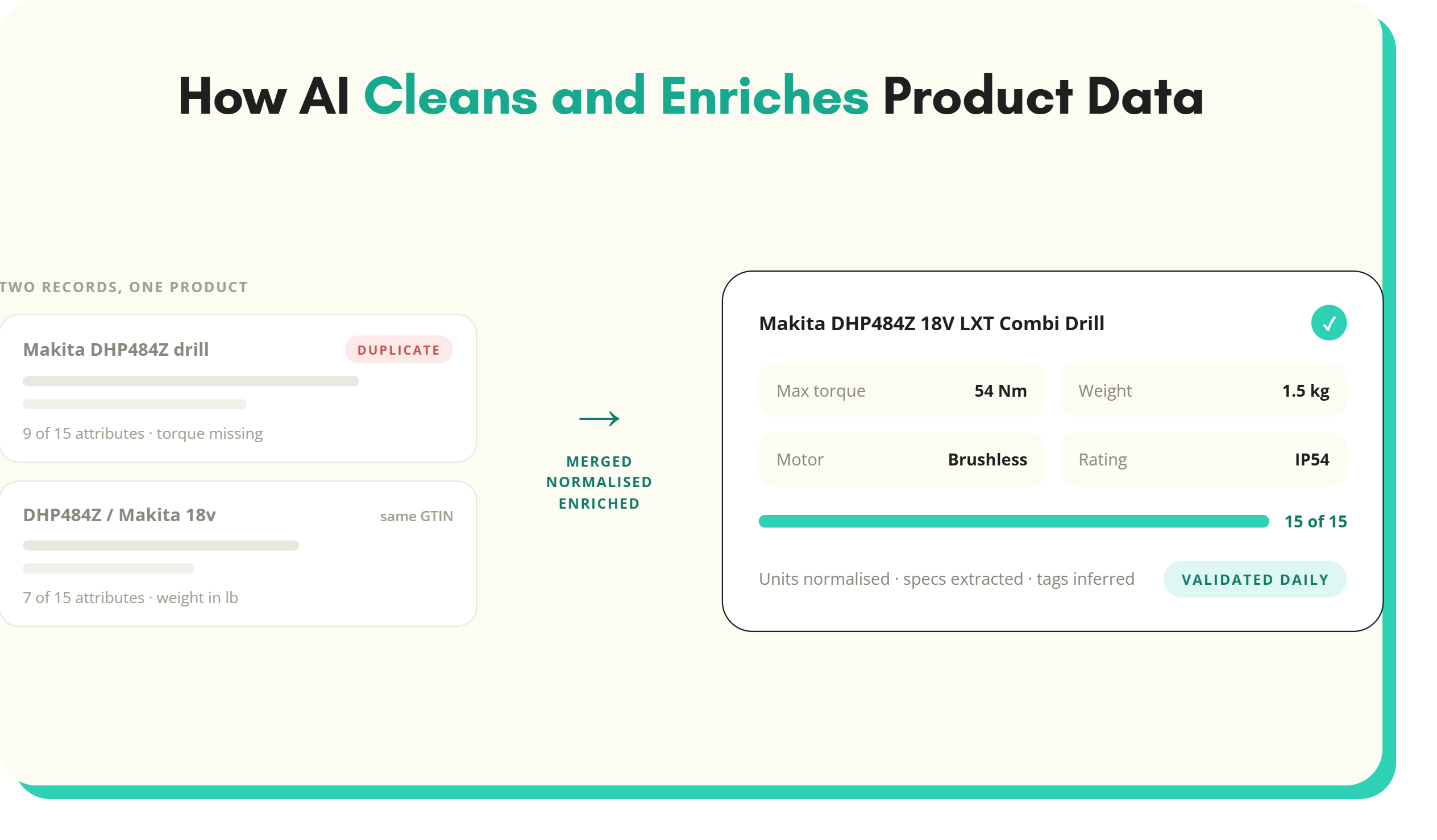
- Enrichment and classification: products are placed in your taxonomy, attributes are normalised and gaps filled, and copy is written.
- Imagery and assets: packshots, lifestyle images, datasheets, manuals and safety documents are collected or created and linked to each SKU.
- Approval: the record is signed off for accuracy and, where relevant, for legal and compliance content.
- ERP and PIM set-up: the item is created for buying, stock and pricing, and the full record is loaded into the PIM.
- Publish to channels: the product goes to the website, marketplaces, print and trade feeds.
- Post-launch checks: someone checks that the product appears in the right category and filters, images display and feeds are accepted.
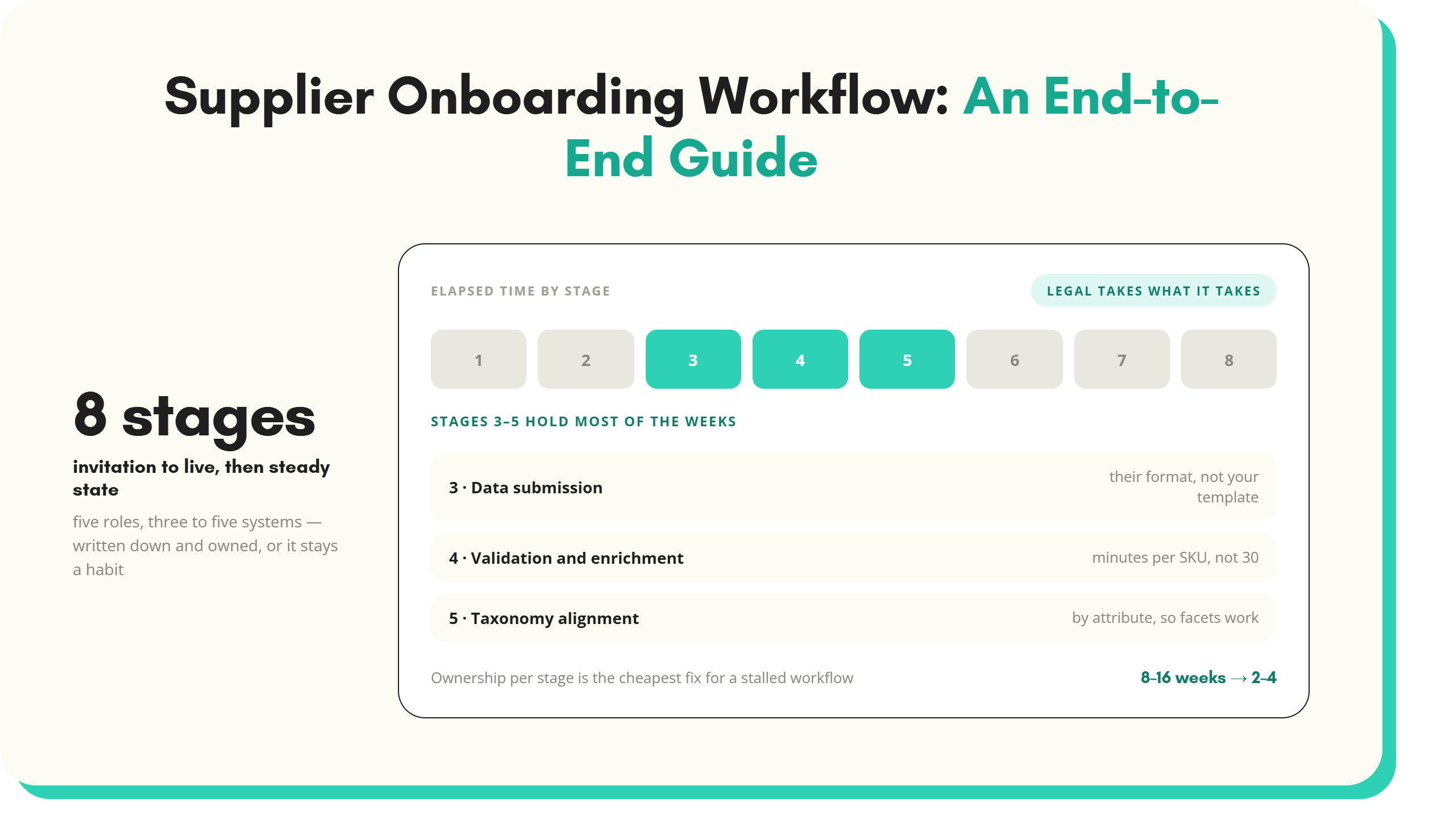
Stages 3 to 6 are what most teams call supplier onboarding. In a well-run process they overlap. Enrichment starts on the first records submitted rather than waiting for the last one.
Who owns each NPI stage
Ownership blurs at the handoffs, and that is where products stall. A typical split:
- Buyer or category manager: range sign-off, commercial terms, chasing the supplier when escalation is needed.
- Supplier management or procurement: supplier set-up for trading and compliance.
- Product data or content team: data request, capture, validation, enrichment, classification and approval of the record.
- Studio or creative team: imagery where the supplier's assets are not good enough.
- Technical, compliance or quality team: approval of regulated claims, safety information and documents.
- ERP or master data team: item creation, cost and price set-up, logistics data.
- Ecommerce or trading team: publishing, merchandising and post-launch checks.
- Supplier: providing complete, accurate data and assets on time. This is the role nobody in the business controls directly.
The fix is not more owners. It is one person accountable for each range end to end, with a tracker everyone reads, not a chase spreadsheet one person maintains.
Typical NPI timelines and where the weeks are lost
There is no reliable industry benchmark for NPI duration in retail, and published figures vary widely by sector. What is consistent is the shape. The work itself takes hours or days per range. The waiting takes weeks.
The common time sinks:
- Late data requests: the template goes out after range sign-off, not alongside the buying conversation, so the supplier starts from zero.
- Data chasing: templates come back partly filled. Each chase waits on the supplier's account manager, who looks after many other customers.
- Rework loops: wrong units, values outside your lists, missing GTINs and mismatched images each trigger another round trip of the whole file.
- Serial handoffs: enrichment waits for all data, imagery waits for enrichment, ERP set-up waits for approval. Each queue adds days.
- Batch thinking: one late product holds up 149 ready ones because the range is treated as a single file.
- Silent failures after launch: products go live in the wrong category or without filter values, and nobody notices until sales disappoint.
Worked example: a 150-SKU seasonal range
A garden and outdoor retailer signs off a 150-SKU spring range from three suppliers: barbecues, garden furniture and outdoor lighting. Launch is in eight weeks to catch the season. The numbers below are illustrative.
The email and spreadsheet route
- Week 1: range signed off. The data team sends each supplier the 200-column master template.
- Weeks 2 to 4: two suppliers return files. The third returns its own price list with a PDF catalogue attached. Nearly half the required attributes are blank, and colours arrive as "Anthracite", "Grey" and "Charcoal" for the same finish.
- Weeks 4 to 6: two rounds of chasing and rework. Lighting IP ratings and lumen output are copied by hand from PDFs. Images arrive in a shared drive with supplier codes as filenames.
- Weeks 6 to 7: enrichment, copy and ERP set-up in a rush. Some furniture goes live without material or seat count values.
- Week 8: 110 products live on time. 40 follow over the next three weeks, into the peak selling window.
The structured route
- Week 0: the data request goes out with the buying confirmation, through a supplier portal showing category-specific fields only.
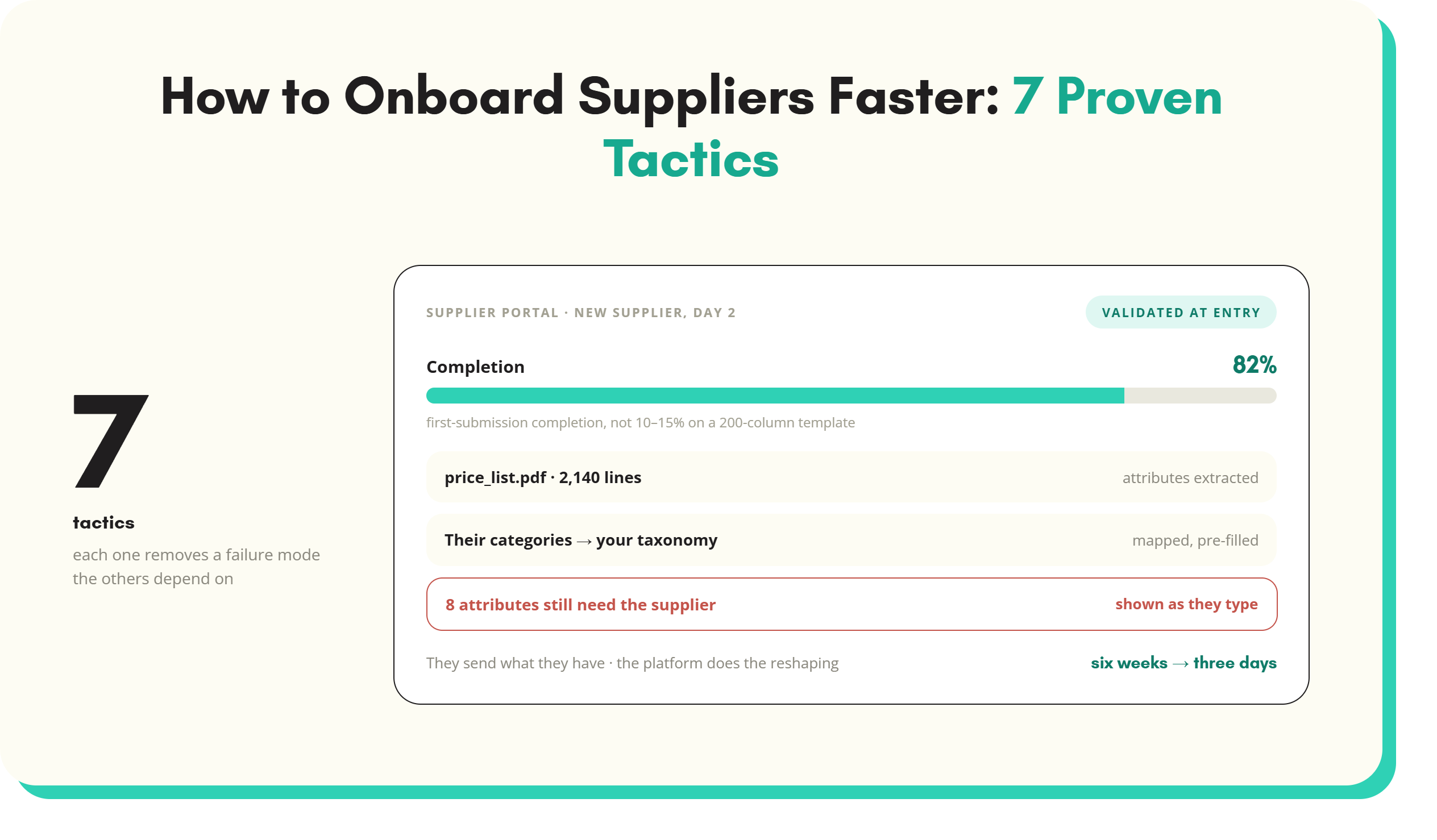
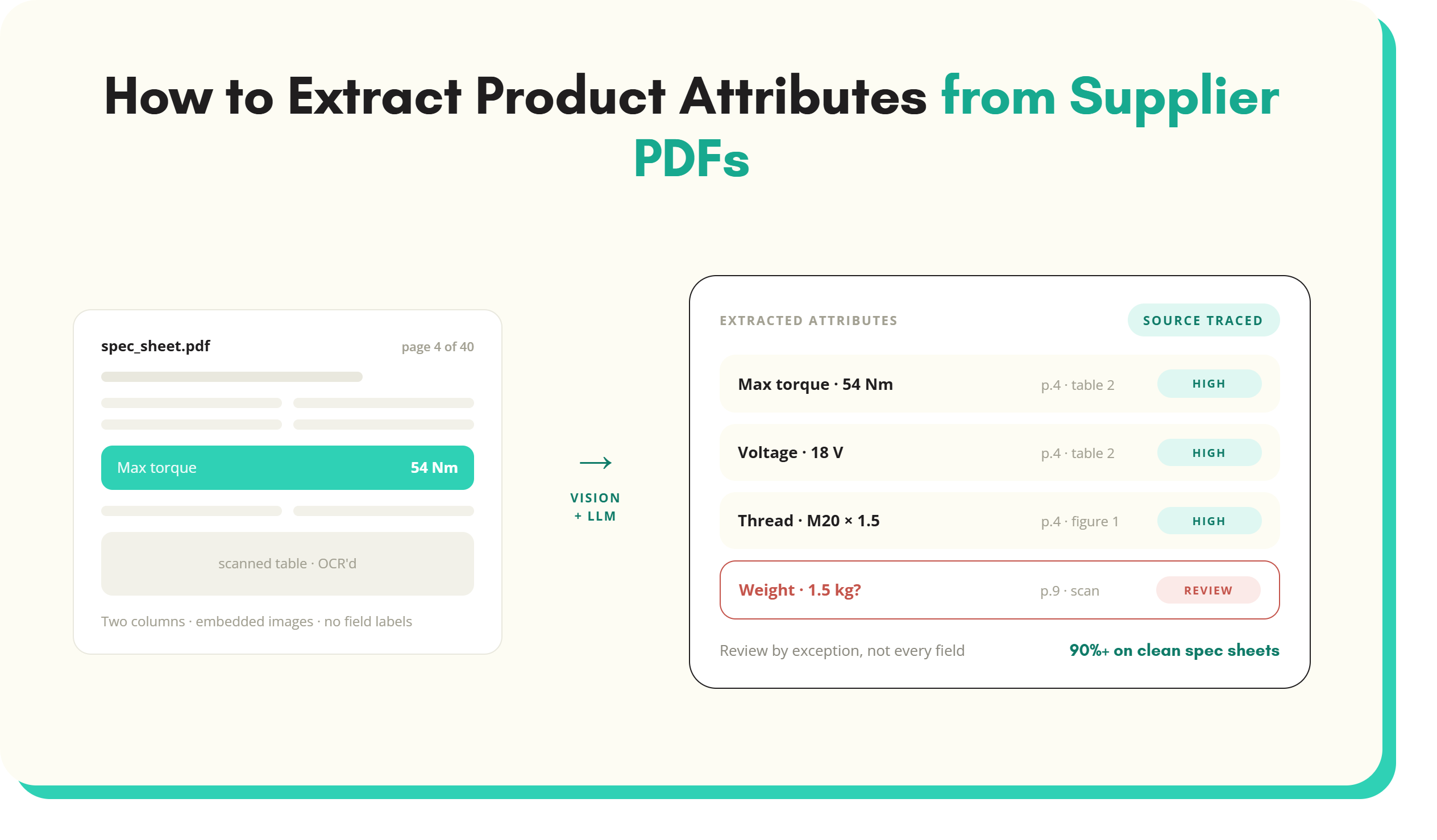
- Weeks 1 to 2: suppliers upload their own files and catalogue PDFs. Extraction pre-fills attributes. Validation flags missing GTINs and colours outside the list at entry.
- Weeks 2 to 4: enrichment, classification and imagery run on each record as it arrives. Returned records go back with field-level comments, not a whole file.
- Weeks 4 to 5: approval and ERP and PIM set-up run in batches as records clear.
- Weeks 6 to 8: products are published ahead of launch, and post-launch checks have time to catch problems.
The work is the same in both routes. The difference is how much time sits between tasks. The new product introduction use case shows the structured route step by step.
NPI metrics to track
- Time to live: days from range sign-off to the product live and buyable. Measure it per SKU, not per range, so one late product does not hide 149 on-time ones. Split it by stage to see where the waiting is.
- First-time-right rate: the share of supplier submissions that pass validation and review without being returned. It shows template quality and supplier capability. Track the return reasons as well as the rate.
- Completeness at launch: the share of required attributes, images and documents present when the product goes live, measured per category. A product live at 60% completeness is live in name only, because it will be missing from filters and feeds.
- Launch date hit rate: the share of SKUs live by the planned date. This is the figure buyers and trading teams care about.
Two SKULaunch customer results give a sense of the change possible. Bowens Australia took PIM completeness from 30% to 94% (see the Bowens Australia case study). Mole Valley Farmers enriched 35,000 SKUs in three weeks (see the Mole Valley Farmers case study).
How to shorten the new product introduction process
- Request data earlier: send the data request with the buying confirmation, not after range sign-off is filed.
- Ask for less, in your structure: category-specific templates with only the fields the category and channels need.
- Validate at entry: catch wrong units, missing GTINs and off-list values while the supplier is still in the form.
- Use what suppliers already have: extract attributes from their PDFs, spec sheets and websites rather than asking them to retype.
- Work per SKU, not per range: let records move to the next stage as they clear, so one late product does not block the rest.
- Run stages in parallel: enrichment, imagery and ERP set-up can overlap once a record passes validation.
- Make one tracker the truth: status by SKU and stage, visible to buyers, data team and suppliers.
- Check after launch: automate checks for category placement, filter values and feed rejections in the first week.
Most of these changes sit in the supplier onboarding stages. The supplier onboarding software guide covers the tooling. The faster time to live page shows how SKULaunch applies them, upstream of a PIM or as one.
New product introduction FAQs
What is new product introduction in retail?
New product introduction in retail is the process that takes a product from the buying decision to live and buyable on every sales channel. It covers range sign-off, supplier set-up, data collection, validation, enrichment, imagery, approval, ERP and PIM set-up, publishing and post-launch checks. It involves buying, product data, ecommerce and supplier teams, and its length is usually set by supplier data quality.
What are the stages of the NPI process?
For retailers and distributors, a typical NPI process has ten stages. The first six are range sign-off, supplier set-up, data request, data capture and validation, enrichment and classification, and imagery and assets. Then come approval, ERP and PIM set-up, publish to channels, and post-launch checks. Stages 3 to 6 make up supplier onboarding and usually take the most elapsed time.
What is the difference between NPI in manufacturing and NPI in retail?
In manufacturing, NPI is the engineering process that moves a new design into volume production, covering prototypes, tooling, testing and production ramp-up. In retail and distribution, NPI starts with a product someone else makes. It covers the commercial, data and system steps needed to list and sell that product. The shared idea is getting a new product to market reliably.
How long does new product introduction take?
It depends on category complexity, supplier capability and how many channels the product goes to. The tasks themselves often take hours per SKU. The elapsed time is mostly waiting: for supplier data, for rework and for handoffs between teams. Measuring time to live per SKU and per stage shows where your own process loses time.
What is time to live in new product introduction?
Time to live is the number of days from range sign-off to a product being live and buyable on a sales channel. It is the main measure of NPI performance. Track it per SKU and split it by stage. That shows whether delays sit with the supplier, the data team, imagery or system set-up, rather than only showing a late range.
How do you speed up new product introduction?
Request supplier data earlier and in your own structure. Validate it as the supplier enters it, and extract attributes from supplier PDFs instead of asking for retyping. Move each SKU to the next stage as soon as it clears rather than waiting for the whole range. Run enrichment, imagery and system set-up in parallel, and track status per SKU in one place.
Key takeaways
- In retail and distribution, NPI runs from range sign-off to product live on every channel. It is not the manufacturing engineering process of the same name.
- The process has ten stages, and the supplier data stages in the middle take most of the elapsed time.
- Weeks are lost to late requests, data chasing, whole-file rework and serial handoffs, not to the work itself.
- Track time to live per SKU, first-time-right rate and completeness at launch.
- Shorten it by requesting data earlier, validating at entry, extracting from supplier documents and moving SKUs individually.
See it in practice: new product introduction from range sign-off to live, onboard a new supplier range in days and the SKULaunch supplier portal.
See SKULaunch in action
Watch how we handle AI enrichment, supplier onboarding, and catalogue scale in a live 30-minute demo.

.avif)