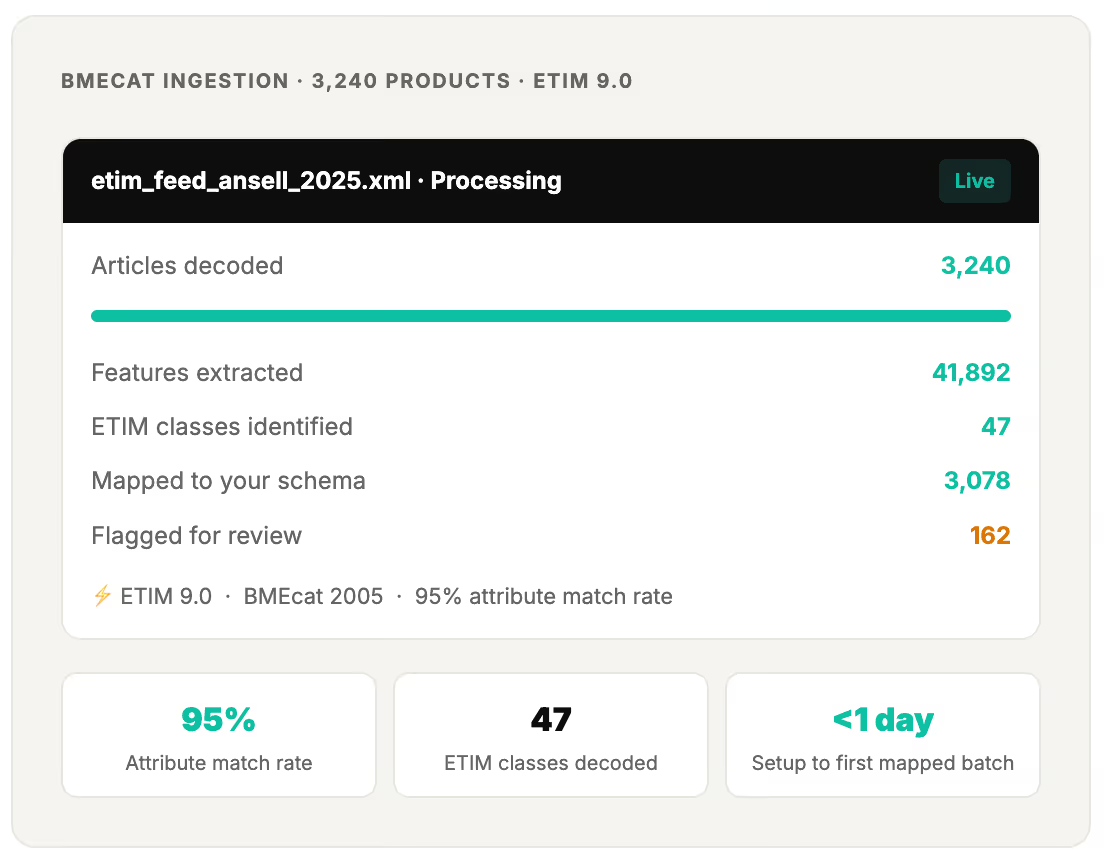
Suppliers send you BMEcat files packed with ETIM-classified product data. SKULaunch reads the files, decodes the ETIM class and feature structure, and extracts every attribute directly into your SKULaunch schema. No XML parsing. No manual feature mapping. No developer required.
ETIM is a classification standard for technical products. It gives every product class a code, defines the features that class should carry, and fixes the permitted values for those features, so a manufacturer and a distributor describe the same item in the same way rather than in two private vocabularies.
It matters most in electrical, HVAC, plumbing and building materials distribution, where a buyer chooses on specification rather than on brand. Without a shared classification, a customer cannot filter by voltage, bore size or IP rating, because those values live in free text descriptions in a different shape for every supplier.
ETIM is a shared language for technical product data, so buyers can filter on specifications instead of guessing from a description.
ETIM is built from four linked pieces. A class identifies what a product is. Features are the specifications that class is expected to carry. Values are the permitted answers for a feature, so nobody types free text where a controlled option exists. Units define how a numeric value is expressed.
Classifying a catalogue means two jobs, and teams usually underestimate the second. First, assign every product to the right class. Second, populate the features that class demands, which is where most catalogues fall short. A product sitting in the correct ETIM class with two thirds of its features blank is still unfilterable, and still fails the channel checks that made you adopt the standard.
The two are routinely confused because they arrive in the same file. BMEcat is the transport format, an XML structure for moving a catalogue between two systems. ETIM is the classification carried inside it. You can send a BMEcat file with no ETIM data in it at all, and you can hold ETIM data without ever touching BMEcat.
In practice the pain is the same either way. A supplier sends BMEcat 2005 or BMEcat 2.1 full of EF, EV and EU codes, and none of it means anything until something translates those codes into attribute names your team recognises. SKULaunch decodes the XML structure and performs that translation automatically, at a 95% attribute match rate, so what lands in your schema is readable rather than a wall of reference codes.
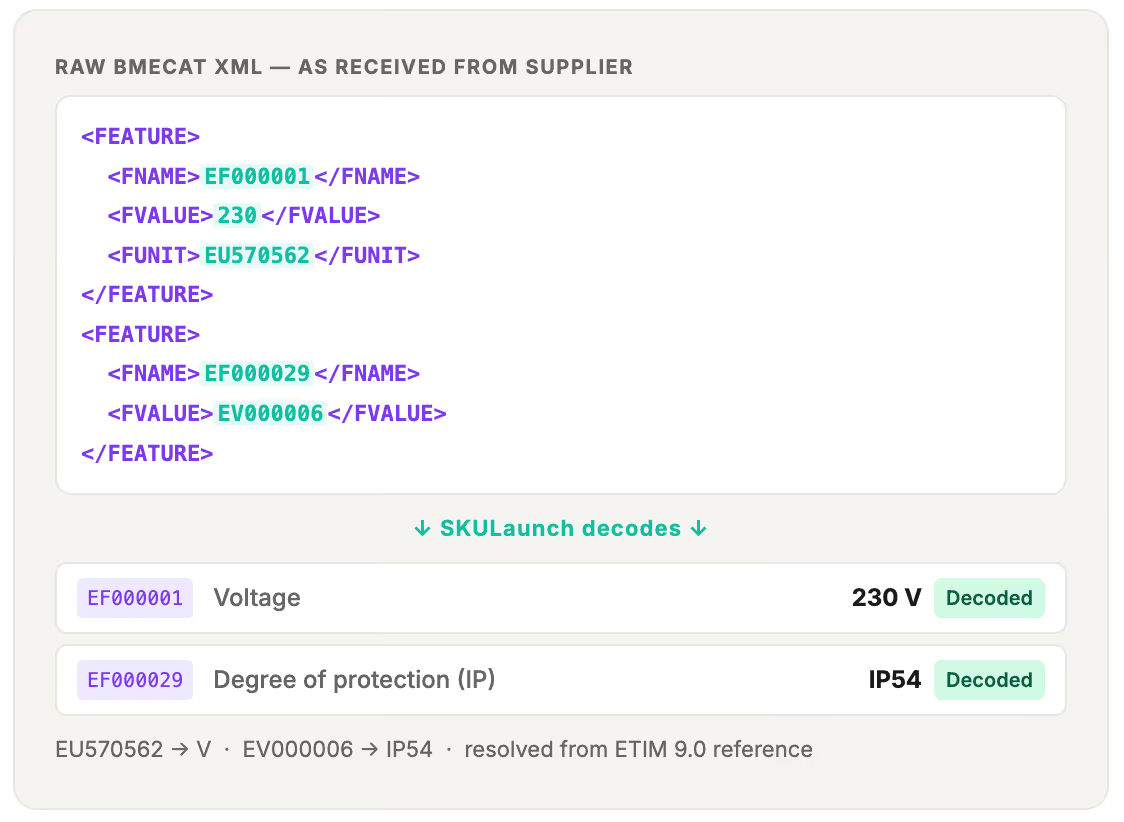
A BMEcat file is structured XML. Inside it, every product has an ETIM class code, a set of feature codes (EF numbers), value codes, and unit codes. That data is precise, standardised, and exactly what you need for your product catalogue — but it's locked inside a format that requires interpretation before it means anything to your team or your systems.
SKULaunch decodes that structure automatically. It reads the BMEcat file, identifies each ETIM class and its features, translates the EF codes into human-readable attribute names, resolves the value and unit codes, and maps the extracted data directly into your SKULaunch attribute schema. Your team sees clean, named product attributes — not XML tags and feature codes.
BMEcat files contain ETIM class codes (EC), feature codes (EF), value codes (EV), and unit codes (EU) — all in XML. The data is precise and standardised but requires an ETIM-aware parser to turn it into usable product attributes.
SKULaunch decodes every EF feature code into its human-readable name, resolves EV value codes into plain values, converts EU unit codes into standard units, and maps the full extracted attribute set directly into your schema — ready to enrich, review, and publish.
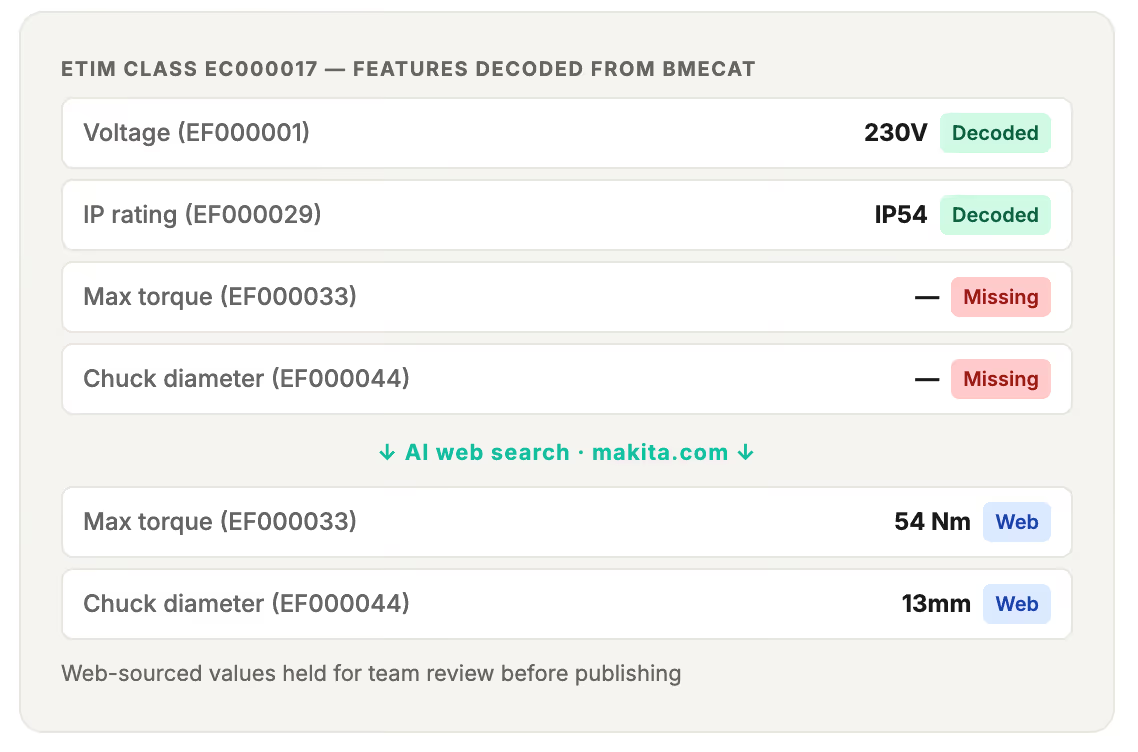
Not every ETIM file is complete. Where features are missing or values are absent, SKULaunch flags the gap and can use AI web search to attempt to fill it from the manufacturer's site — with confidence scoring on every value it adds.
Decoded, mapped attributes flow into SKULaunch for review and enrichment — then push to your PIM, ecommerce platform, or ERP via direct integration. Akeneo, Shopify, Plytix, Magento, and Mirakl all supported.
The ingestion pipeline is fully automated. Here is what happens at each stage.
A supplier sends you a BMEcat 2005 or BMEcat 2.1 file. SKULaunch reads the XML structure, identifies every ARTICLE block, extracts the ETIM class code (EC), and translates every feature code (EF), value code (EV), and unit code (EU) into human-readable product attributes — using the full ETIM 9.0 reference library.


Once decoded, the ETIM attributes need to map to your internal attribute schema — your names, your structure, your accepted values. SKULaunch does this automatically using AI, matching decoded ETIM feature names to your existing schema attributes. Where your schema uses different names or groupings, the mapping is resolved without manual rules.
ETIM files are rarely complete. Suppliers populate the features they have — and leave others blank. Where a feature is present in the ETIM class definition but missing from the supplier's file, SKULaunch flags the gap and can attempt to fill it using AI web search against the manufacturer's product page. Every web-sourced value is confidence-scored and held for review.
No XML parsing. No feature code lookups. No developer required. Your first decoded and mapped batch is ready within 48 hours of setup — run on demand for every new supplier file that arrives.
Upload a BMEcat file directly, connect your supplier portal so files arrive automatically, or have suppliers submit via the SKULaunch portal link. BMEcat 2005 and BMEcat 2.1 both accepted. No pre-processing required.
SKULaunch parses the BMEcat XML, identifies the ETIM class for each article, decodes every EF feature code, EV value code, and EU unit code into human-readable attributes, and maps them to your schema. Gaps are flagged and optionally filled via web search.
High-confidence mappings are ready for approval immediately. Low-confidence mappings and web-sourced gap fills are held in a review queue for your team. You approve, reject, or correct — then mark the batch ready to publish.
Approved product records push directly to your PIM, ecommerce platform, or ERP — Akeneo, Shopify, Plytix, Magento, or Mirakl. Every attribute correctly named, correctly valued, correctly structured for your destination system.
If your suppliers send BMEcat files and getting that data into your system currently involves manual XML parsing, spreadsheet exports, or a developer — SKULaunch automates the entire process.
Receiving BMEcat files from major manufacturers like Schneider, ABB, and Legrand. SKULaunch decodes the ETIM features and maps them to your product schema without any manual handling of the XML.
Managing product ranges where some suppliers provide ETIM BMEcat files and others don't. SKULaunch handles both in the same pipeline — ETIM files decoded, non-ETIM files extracted via AI — into your single schema.
Working with suppliers who use ETIM for electrotechnical product ranges. Getting those technical attributes — voltage, IP rating, dimensions — into your digital catalogue quickly and accurately.
Running a PIM implementation where the ETIM supplier files are sitting unprocessed because the team doesn't have the tooling to decode them at scale. SKULaunch clears the backlog.
Trying to get ETIM-supplied technical attributes — voltage, IP rating, cable cross-section — into filterable product pages. SKULaunch extracts them from the BMEcat file and pushes them to Shopify, Akeneo, or Plytix automatically.
Responsible for the quality of incoming supplier data across all formats. ETIM files processed, decoded, mapped, confidence-scored, and reviewed in one governed workflow — with full audit trail.
A BMEcat file with ETIM data is better than a spreadsheet — in theory. In practice, if you don't have a tool that reads it automatically, someone on your team is opening the XML in a text editor, looking up EF codes in the ETIM reference, and manually entering the decoded values into your PIM. The data quality is there in the file. The bottleneck is the extraction.
Someone opens the XML, looks up each EF code in the ETIM reference library, decodes the value and unit codes, and enters the attributes one by one into your PIM. 50–80 products per day at best.
Products decoded and mapped in a single automated run. Your team reviews the flagged exceptions — not every EF code in every article block. The file's data is in your schema the same day it arrives.
Average attribute completeness improvement after ETIM decode and extraction — from typical baseline to full filter coverage. Attributes that were in the file but stuck in XML are now in your product pages.
SKULaunch customers include distributors who receive BMEcat files from major electrotechnical manufacturers and need those files processed without manual XML handling or developer resource.
Trusted by
APS Industrial
Mole Valley Farmers
RS Group
Bowens Australia
Maxiparts

Upload BMEcat 2005 and BMEcat 2.1 files directly or connect your supplier portal for automatic ingestion. No pre-processing, no file conversion, no developer required.
Read More →
Every EF feature code translated to its human-readable attribute name. EV value codes resolved to plain values. EU unit codes converted to standard unit labels. Full ETIM 9.0 reference library applied automatically.
Read More →
Decoded ETIM attributes mapped to your SKULaunch schema automatically — handling name differences between ETIM feature labels and your internal attribute names without manual mapping rules.
Read More →
Missing features flagged against the ETIM class definition. AI web search attempts to fill gaps from manufacturer sites — every web-sourced value confidence-scored and held for team review.
Read More →
ETIM BMEcat files and non-ETIM supplier submissions (spreadsheets, PDFs, product URLs) processed in the same pipeline. All sources output to your single unified schema.
Read More →
GS1 data feeds ingested and mapped to your schema alongside ETIM BMEcat files. Handles a mixed supplier landscape of ETIM, GS1, and non-standard formats without separate workflows.
Read More →
Every decoded mapping carries a confidence score. High-confidence attributes auto-approved. Low-confidence and web-sourced values flagged for your team. Nothing publishes without sign-off.
Read More →
Approved product records push directly to Akeneo, Shopify, Plytix, Magento, and Mirakl. Attributes correctly named and structured for each destination system — no reformatting required.
Read More →
The AI enrichment pipeline in detail — confidence scoring, overnight runs, exception review.
Read More →How SKULaunch handles the volume, supplier count, and technical complexity of B2B distribution.
Read More →A plain-English guide to SKU enrichment — what it means, why it matters, and how to do it at scale.
Read More →
The AI product data platform that turns messy supplier files into sales-ready content. Run it upstream of your PIM, or run it as one.
.avif)