

How facets are built from product attributes, why filters show duplicate values, how to handle facet URLs for SEO, and how to audit them.
Faceted search lets a buyer narrow a product listing by several attributes at once. Each filter, or facet, is built from a structured product attribute and only shows values that exist in the current results. A buyer looking at 4,000 cables can tick 3 core, 2.5 mm² and white, and see the 40 that match. Retailers also call this faceted navigation or ecommerce filters. Whatever the name, facets only work when the attribute data underneath is complete and consistent. On most catalogues it is not.
What is faceted search?
A facet is one dimension of a product that a buyer can filter by: colour, voltage, size, brand, number of cores. Each facet has a set of values (white, black, grey), usually shown with a count of matching products. Selecting a value narrows the results, and every other facet updates to show only the values still available.
Two behaviours separate faceted search from a simple filter box. First, values within one facet usually combine with OR (white or grey), while values across facets combine with AND (white and 3 core). Second, the facet list is dynamic. It is generated from the products in the current result set, not from a fixed menu.
Faceted navigation is the same mechanism applied to category browsing, where the buyer starts from a category page rather than a search box. Most teams use faceted search, faceted navigation and product filters interchangeably. The data requirements are identical.
Facets vs filters vs categories
The three get blurred in project meetings, and the blur causes bad design decisions. A useful way to separate them:
- Category: answers "what kind of product is this?" A product sits in one place in the taxonomy. The category decides which attributes and facets apply.
- Facet: answers "which one of these do I want?" It is built from an attribute that varies within the category, such as cross-sectional area. It shows counts.
- Filter: any control that removes products from a list. Every facet is a filter. Not every filter is a facet: "in stock" and "on offer" come from stock and pricing systems, not product attributes.
A common mistake is using categories to do a facet's job. Separate categories for "2 core flex", "3 core flex" and "4 core flex" push a facet value into the tree. The tree gets deeper and the buyer can no longer compare across core counts. If the only difference between two sibling categories is one attribute value, that attribute should be a facet. The guide to product attributes covers how category-specific attributes are defined.
How faceted search builds a facet from an attribute
Every facet traces back to an attribute in the product schema. The chain looks like this:
1. Attribute definition. The schema sets the name, data type, unit and, for list attributes, the allowed values. "Number of cores: integer" or "Sheath colour: single select from 12 values".
2. Values on each SKU. Each product record holds a value, ideally drawn from the allowed list.
3. Search index field. The PIM or ecommerce system sends the attribute to the search engine as a filterable field.
4. Facet configuration. This sets the display (checkbox, range slider, colour swatch) and the sort order of values. It also sets multi-select and which categories show the facet.
The data type matters more than most teams expect. List attributes make clean checkbox facets. Numeric attributes with a fixed unit make range sliders. Yes or no attributes make toggles. Free text cannot become a useful facet, because every slightly different string becomes its own value. A free-text attribute needs normalising before anyone can filter on it.
Worked example: faceted search on a cable category
Take a flexible cable category on an electrical wholesaler or DIY retailer site, with products from four suppliers. The schema might hold 15 attributes. Not all of them should be facets.
Good facet candidates: number of cores, cross-sectional area (mm²), cable type (H05VV-F, H07RN-F), sheath colour, length, voltage rating and brand. These are the attributes a buyer uses to choose.
Attributes that stay on the product page: outer diameter, weight per kilometre, minimum bend radius and conductor class. A specifier may need them, but few buyers start a search from them.
Now look at what the four supplier files contain for cross-sectional area:
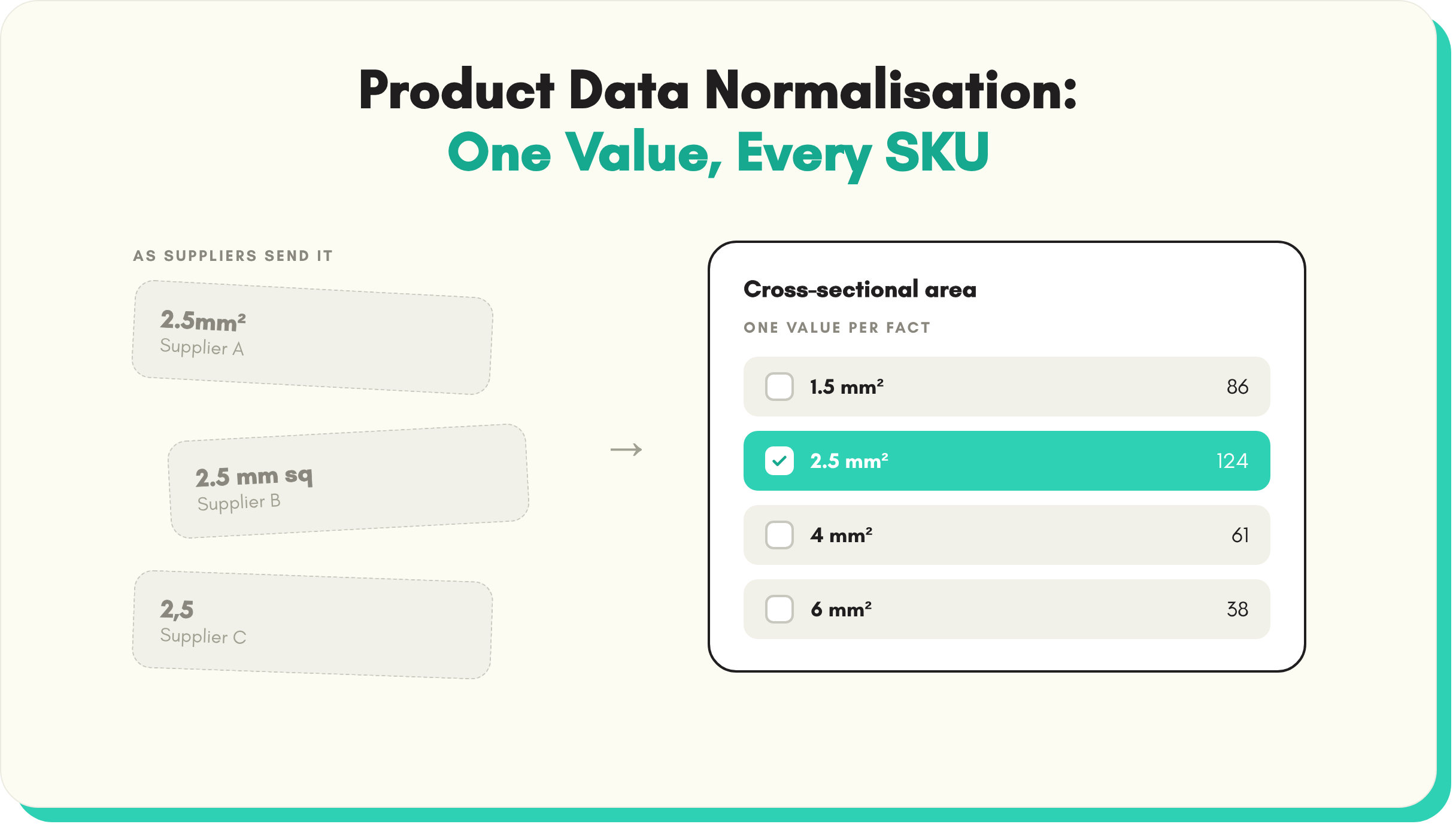
- Supplier A: 2.5mm²
- Supplier B: 2.5 mm sq
- Supplier C: 2,5 (decimal comma, unit in the column header)
- Supplier D: no separate field; the value sits inside the product name "3G2.5 flex white 50m"
Loaded as received, the facet shows three versions of 2.5, and Supplier D's products appear under none of them. A buyer who ticks 2.5mm² sees roughly a quarter of the matching range. The rest looks as if it does not exist.
The same pattern repeats across the category. Colour arrives as "White", "WHT", "wh" and "Arctic White". Core count arrives as "3", "3 core" and "3G", where the G in a harmonised cable code means one core is green and yellow earth. Length arrives as "50m", "50 m coil" and "Coil 50". Voltage rating is missing on a third of the SKUs because one supplier never sends it.
The fix is not a search setting. It is data work. Store cross-sectional area as a number with a fixed unit. Map every colour variant to one value list. Split "3G2.5" into core count and area. Chase or extract the missing voltage ratings. Once that is done, the facets work for every supplier.
Faceted navigation and SEO
Every facet selection can create a new URL. A category with six facets can generate hundreds of thousands of filter combinations, most of them near duplicates. Search engines can then spend crawl budget on those URLs instead of product and category pages.
Google's Search Central documentation on managing crawling of faceted navigation URLs sets out the main options. Filtered pages that do not need to rank can be blocked with robots.txt. Alternatively, the filter state can sit in a URL fragment (after the #), which Google generally ignores for crawling. The same guidance calls rel="canonical" a weaker, slower signal. It also recommends a 404 status for filter combinations that return no results.
A practical approach for most retailers and distributors:
- Pick a small set of indexable facet pages that match real search demand, such as "3 core flex cable". Give them clean URLs, their own title, a short introduction and links from the parent category.
- Keep every other combination out of the crawl. Multi-select combinations, sort orders and price ranges rarely deserve to rank.
- Do not block and noindex the same URL. If robots.txt blocks a page, the crawler never sees its noindex tag.
- Keep the facet values clean. An indexable page called "anth grey garden lights" is a data problem showing up in search results.
Facet SEO is mostly technical configuration owned by the ecommerce team. The part product data teams own is the values. Clean values give landing pages worth indexing. Messy values give thousands of thin duplicates.
Completeness thresholds for faceted search
A facet only helps if most products in the result set have a value for it. If half the cables lack a voltage rating, ticking 300/500 V hides every product with no value. Some of those would have matched. The buyer never knows what they lost.
Set a completeness threshold per facet. A common starting point is to show a facet only when around 80% of products in the result set hold a value. Treat anything lower as a gap to close. Safety-critical attributes such as voltage rating deserve a higher bar than finish or style.
Measure completeness per category and per facet attribute, not across the whole catalogue. A healthy overall figure can hide a top-revenue category where the key facet sits at 20%. Bowens Australia took its PIM completeness from 30% to 94%, as set out in the Bowens Australia case study.
Watch value counts too. A brand facet with 300 values is a phone book, not a filter. Long value lists usually signal unnormalised data: 40 shades of grey that should be six.
Value normalisation: the work behind clean facets
Value normalisation converts every supplier's way of expressing a fact into one agreed format. It covers units, number formats, synonyms, casing and attribute names. The full method is in the guide to product data normalisation.
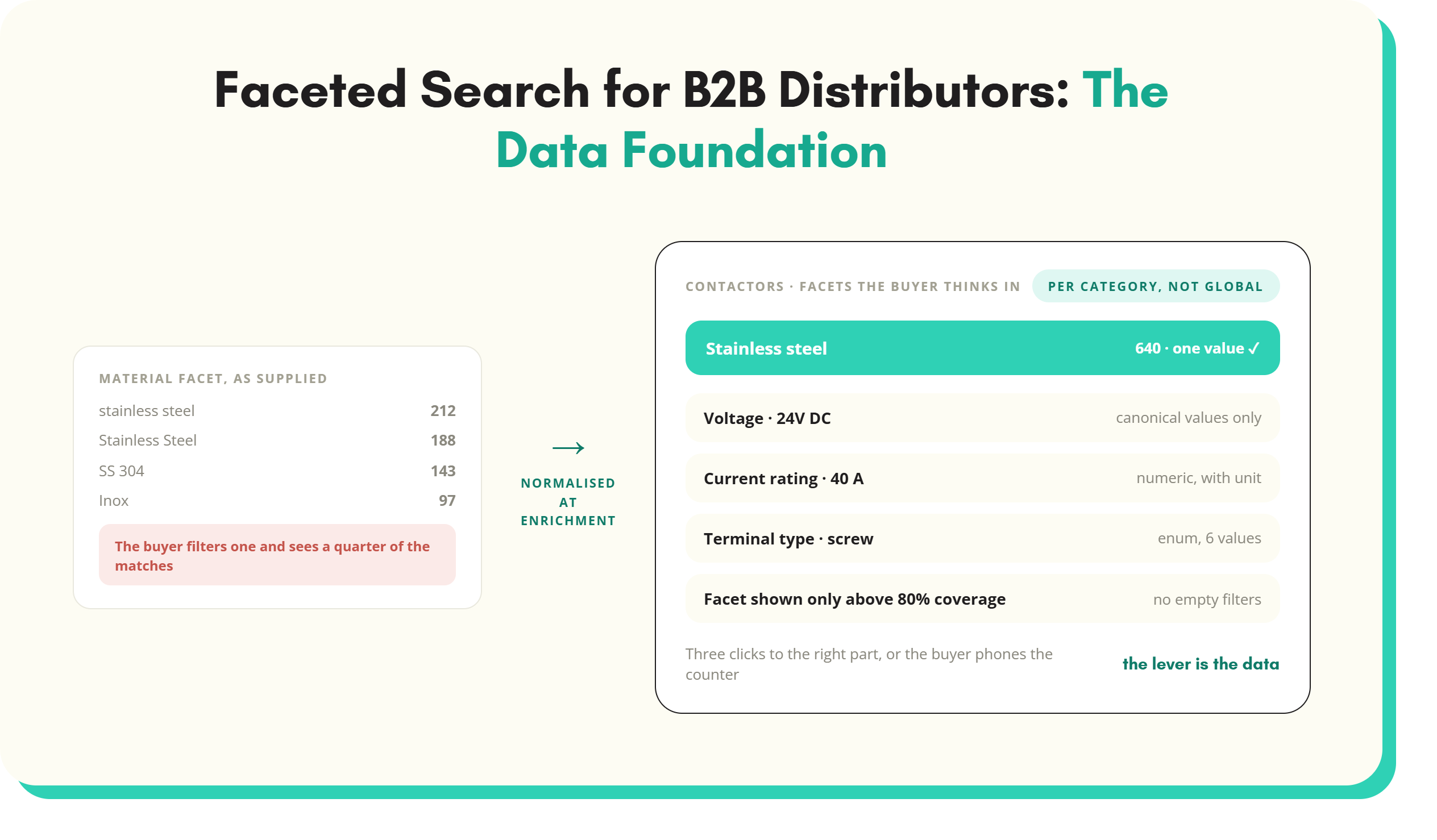
Two rules matter most for faceted search. First, normalise at onboarding, not in the search index. A synonym rule for "Inox" in the index leaves the value wrong in the PIM, on the data sheet and in every marketplace feed. Fix the record once and every channel inherits it.
Second, normalise against a value list per attribute. The list sets the allowed sheath colours and records that "WHT", "wh" and "Arctic White" all map to White. New supplier files are checked against it. Anything that does not match goes to a review queue, not straight into a facet. This is the core of a filterable catalogue.
Faceted search for distributors
Distributor buyers search differently from consumers. They have a part number, a drawing or a replacement they need by Tuesday. They want a 24 V DC contactor rated at 40 A with screw terminals. They think in current rating, coil voltage, pole count and mounting style.
That has three consequences. Facets have to be category-specific, because contactors, cable glands and safety boots share almost nothing. Numeric facets need consistent units, because a buyer filtering on 40 A misses a product stored as "40 amps". And facet depth matters more than in retail, because the buyer is matching a specification.
When the facets fail, the buyer phones the trade counter or buys from a competitor whose site filtered cleanly. Classification standards help. In electrical, plumbing and HVAC, ETIM defines features per product class with set units and values. That is a ready-made list of facet candidates. The wider picture is in the guide to product data management for distributors.
How to audit your faceted search
A facet audit needs an export of the product data and the facet configuration. Start with the top 20 categories by revenue.
1. List the facets per category. Flag categories running only global facets such as brand and price.
2. Export the distinct values for each facet attribute. Sort them alphabetically. Duplicate spellings, casings and units appear immediately.
3. Measure completeness per facet. Mark any facet attribute below your threshold.
4. Compare facets with real demand. Pull the top site search terms and, for distributors, common trade counter requests. Check a buyer could reach the right product in three clicks.
5. Test zero-result combinations. Apply common facet pairs. Unexpected empty results usually mean missing or mismatched values.
6. Check URL handling. Confirm which facet URLs are crawlable and indexable, and that the answer is deliberate.
7. Fix at source and re-run. Normalise values and fill gaps in the product records, then repeat the audit.
The output is a short list per category: facets to add, facets to remove, value lists to build and gaps to fill. For distributors, that list usually becomes the backlog for the wider distributor product data programme.
Faceted search FAQs
What is faceted search in ecommerce?
Faceted search in ecommerce lets shoppers narrow a product list by several attributes at once, such as size, colour, brand and price. Each facet is built from a structured product attribute. It shows only the values present in the current results, usually with a product count. Selecting a value updates the results and the other facets. It depends on complete, consistent attribute data across the category.
What is the difference between faceted search and faceted navigation?
Faceted search usually means filtering a set of search results. Faceted navigation usually means filtering a category page the shopper reached by browsing. The mechanism is the same: dynamic filters built from product attributes, with counts that update as selections are made. Most retailers and distributors use the two terms interchangeably, and the product data behind them is identical.
What is the difference between filters and facets?
A filter is any control that removes products from a list, including stock status, price band or on-offer flags. A facet is a filter generated from product attributes, such as voltage or material. It shows the values available in the current results and how many products match each one. Every facet is a filter, but filters driven by stock or pricing data are not facets.
Why are my product filters showing duplicate values?
Duplicate filter values almost always come from unnormalised product data. Suppliers write the same value differently, such as "Stainless Steel", "SS" and "Inox". The search engine treats each string as a separate value. The fix is to map every variant to one canonical value in a controlled list at onboarding. The product records are then correct before they reach the search index.
How many facets should a category page have?
Most category pages work best with five to eight category-specific facets, plus a few global ones such as brand and price. More than that buries the useful ones. Choose facets from the attributes buyers use to decide between products, and check them against site search terms. Only show a facet when most products in the result set have a value for it.
Is faceted navigation bad for SEO?
Faceted navigation is not bad for SEO in itself, but it can create huge numbers of near-duplicate filter URLs that waste crawl budget. Google's guidance is to block filter URLs that do not need to appear in search, for example through robots.txt or URL fragments. Many sites then create a small number of indexable facet landing pages for combinations with real search demand.
Key takeaways
- Faceted search filters products by several attributes at once, and every facet traces back to a structured attribute in the schema.
- Categories say what a product is. Facets say which one the buyer wants. Do not push facet values into the taxonomy.
- Most broken facets are a data problem: inconsistent values, mixed units and missing attributes, not a weak search engine.
- Set completeness thresholds per facet and per category, and normalise values at onboarding against a controlled value list.
- Control which facet URLs are crawled and indexed, and keep indexable facet pages to combinations with real search demand.
- Audit the top categories by revenue first: distinct values, completeness, buyer demand and zero-result combinations.
See it in practice: turn free text into controlled value lists, normalise units of measure across every supplier and measure completeness by category and channel.
See SKULaunch in action
Watch how we handle AI enrichment, supplier onboarding, and catalogue scale in a live 30-minute demo.


.avif)