

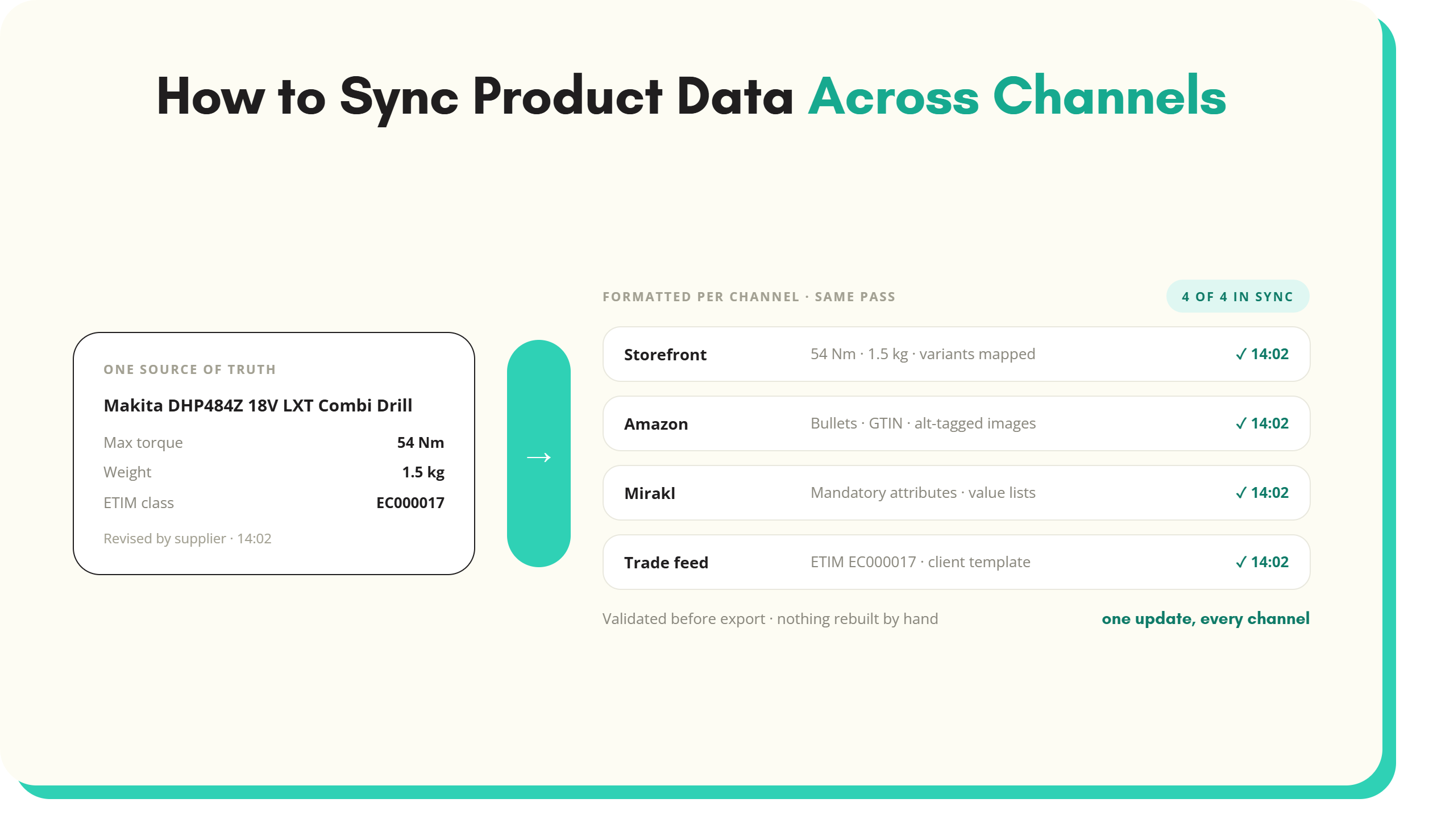
Learning how to sync product data across every channel at once is what closes that gap.
Selling across multiple channels, a storefront, a marketplace, a PIM feeding both, and a trade customer’s catalogue feed, means the same product data has to stay accurate everywhere at once. When it does not, the symptoms are familiar. One channel shows the revised specification, another still shows last year’s. The same product carries three different names on three platforms. A listing gets rejected for missing an attribute a different channel never required. Learning how to sync product data across every channel at once is what closes that gap.
Fixing this is less about any single tool and more about a repeatable process. The five steps below cover what that process actually involves. They run from centralising the source data through to scaling it across new channels, without the process itself becoming a new bottleneck to manage.
Why businesses need to sync product data across channels
The underlying causes, why formatting mismatches, delayed updates, and inconsistent listings happen at all, are covered in more depth in the product data exports guide and the product data updates guide. In short, every channel expects a slightly different format, and suppliers keep changing the underlying information after launch. Data that is only reconciled periodically is, by definition, out of date for some portion of the time between updates. The steps that follow are the practical response to both problems, rather than a repeat explanation of why they happen.
Step 1: Centralise the data before you sync product data
Syncing starts with one source of truth, not five spreadsheets that each claim to be current. A PIM or a dedicated supplier onboarding platform holds product names, SKUs, specifications, classifications and images in one place. It standardises the data before it goes anywhere else, and pushes updates out to every connected channel from that single point rather than from whichever file was edited most recently.
Centralisation matters more as the catalogue and channel count grow. A retailer selling on two platforms can just about manage two sets of near-duplicate data by hand. A distributor holding 30,000 technical SKUs from 40 suppliers cannot. The master spreadsheet stops being a source of truth the day two people save different versions of it.
Step 2: Automate channel-specific formatting
Each channel expects data in its own shape. Amazon wants bullet points, GTINs and alt-tagged images. A Mirakl-powered marketplace enforces its own mandatory attributes and controlled values. Shopify and Magento hold variants and custom fields differently. A trade customer wants the same catalogue delivered as an ETIM-classified file in its own template. None of these formats are compatible with each other by default.
Mapping one centralised dataset to each channel’s specific requirements, through channel-specific templates, formatting rules, and automated validation before export, replaces manual reformatting with a configuration that runs the same way every time a listing updates. This is the same mapping problem covered from the export side in the product data exports guide, applied specifically to keeping several channels synchronised with each other rather than exporting to just one.
Step 3: Sync supplier changes as they arrive
The product information itself keeps moving after launch. Suppliers revise specifications, reissue datasheets, replace discontinued lines with successor SKUs, update compliance documentation and send new images, all on their own schedule. A change that is processed once at the source should reach every connected channel in the same pass.
The alternative is a periodic manual pass, and a manual pass that runs monthly means every channel shows last month’s specification for part of every month. The buyer comparing the storefront against the marketplace finds two different dimensions for the same part and trusts neither. The product data updates guide covers this post-launch drift, and what catches it, in more depth.
Step 4: Validate and monitor continuously
Waiting for a listing to break before investigating is the most expensive way to find a sync problem, since by then a customer has usually already encountered it. Automated validation checks data before export, covering required fields, formatting, image specifications and classification completeness. Ongoing monitoring tracks sync status across every channel rather than assuming a sync that worked last week is still working today. Alerts for failures or mismatches surface a problem while it is still small enough to fix in minutes rather than after it has affected a run of orders.
In a technical catalogue the checks that matter most are the unglamorous ones. A voltage present on every SKU in the range. A unit of measure consistent across a product family. An ETIM class assigned before the trade feed builds. Each one is a rejected listing or a customer query prevented before it exists.
Step 5: Scale without the process becoming the bottleneck
Once the first four steps are in place, adding a new SKU, a new marketplace, a new supplier range or a new client feed does not require rebuilding the sync process from scratch. Centralisation, formatting, supplier-change handling and validation all apply to the new addition automatically, the same way they apply to everything already live. The alternative, treating each new channel as a fresh manual project, is what causes syncing to become slower precisely at the moment a business is trying to grow faster.
For a distributor, the growth moments are lumpy. A new supplier arrives with 2,000 SKUs in a PDF catalogue, or a trade customer switches to a new template overnight. A process built this way absorbs the lump as more volume through the same five steps, not as a new project with its own deadline.
What this looks like in practice
Take a hypothetical industrial distributor with 30,000 technical SKUs, selling through its own storefront and a marketplace while supplying an ETIM-classified catalogue file to its largest trade customer. Before centralising, each channel needs a separate upload with slightly different formatting. The marketplace flags listings for missing mandatory attributes the storefront never required. The trade customer’s file is rebuilt by hand each quarter. A supplier’s mid-year specification revision reaches the storefront weeks before it reaches anywhere else, if it reaches anywhere else at all.
After centralising product data into one system and automating the formatting and sync steps above, the same catalogue updates once and reaches every channel in the same pass, correctly formatted for each one. A supplier’s revised datasheet propagates when it is processed rather than at the next quarterly rebuild, and formatting-related listing rejections drop, since validation catches before export the same issues that used to surface only after a channel rejected the listing. None of this depends on the distributor growing its team. It depends on the process no longer requiring one person to manually reconcile several spreadsheets every time something changes somewhere in the catalogue.
How to sync product data right, long-term
Syncing product data across channels is not a project with an end date. New channels get added, existing ones change their requirements, and suppliers keep revising specifications regardless of how well the last sync ran. A process built around centralised data, automated formatting, supplier-change handling and continuous validation, run through a single supplier onboarding platform rather than several disconnected tools, is what keeps that manageable as the number of channels grows, rather than turning every new channel into another manual workload.
To see how SKULaunch handles multi-channel sync in practice, request a demo.
See it in practice: send different attributes to different channels, write different product copy for each channel and fill Shopify metafields from structured attributes.
See SKULaunch in action
Watch how we handle AI enrichment, supplier onboarding, and catalogue scale in a live 30-minute demo.


.avif)