

A documented supplier onboarding process turns that habit into something you can measure, improve, and scale.
Most retailers and distributors don’t have a supplier onboarding workflow. They have a habit. A new supplier emails a spreadsheet, someone in merchandising opens it, someone in IT pulls a price list, and three weeks later the products are live with missing attributes and the wrong category. A documented supplier onboarding process turns that habit into something you can measure, improve, and scale.
This guide covers the eight stages of an end-to-end workflow, who owns each one, what tools fit, and the timings to aim for.
What a supplier onboarding workflow should cover
A supplier onboarding workflow is the sequence of checks, contracts, data exchanges, and approvals moving a supplier from "we want to sell their range" to "their products are live". It covers six concerns:
- Identity verification: confirming the supplier is a legal entity authorised to trade.
- Commercial terms: pricing, margin, payment terms, returns, marketing contribution, minimum order quantities.
- Product data submission: the supplier’s catalogue in whatever format: PDFs, spreadsheets, images, URLs, feeds.
- Data validation and enrichment: turning raw inputs into structured records that match your schema, with required attributes.
- Categorisation: mapping each product to your taxonomy: storefront category, PIM location, search facets.
- Activation and going live: pushing approved records to PIM, ecommerce, marketplaces, and activating.
Each concern is its own stage with its own owner, tooling, and failure modes. If any stage stalls, the whole onboarding stalls.
The 8-stage supplier onboarding workflow
Workflow order matters. Enriching data before you have a signed agreement, or activating before review, is how onboarding ends up with the wrong products at the wrong prices in the wrong category.
Stage 1: Supplier invitation and account creation
What happens: a buyer invites the supplier into onboarding. The supplier creates an account in a supplier portal and provides company information: legal name, registration, contacts, banking.
Who owns it: commercial or category management. Portal administered by data or operations.
Systems involved: supplier portal, sometimes a CRM or procurement system (Coupa, SAP Ariba).
Typical timing: 1 to 3 days, mostly waiting for the supplier.
Common failure points: invitations lost in shared inboxes; supplier never completes setup.
Stage 2: Commercial and legal terms
What happens: trading terms are agreed and signed. Typically, a Master Supplier Agreement plus a pricing schedule, with annexes covering data quality, image specifications, lead times, and SLAs.
Who owns it: commercial manager, with legal and finance reviewing. Supplier signs.
Systems involved: contract management (DocuSign, Ironclad), the finance system.
Typical timing: 2 to 6 weeks. Can run in parallel with stage 3 once commercial principle is agreed.
Common failure points: legal review drags; a stage 1 pricing dispute resurfaces; data quality terms dropped because the data team isn’t available.
Stage 3: Product data submission
What happens: the supplier submits their product data. Most retailers send a spreadsheet template; the supplier returns it incomplete because the column headers don’t match their own system. Better setups accept the supplier’s native format and do the lifting internally.
Who owns it: data team, with the supplier submitting.
Systems involved: supplier portal, file storage, sometimes email when the portal is too cumbersome.
Typical timing: 1 week for a well-prepared supplier, 6 to 12 weeks for one whose data is scattered.
Common failure points: here’s where most onboarding workflows die. The supplier sends a PDF, you send a template, they fill in 12% of it and ignore the rest. The pattern is covered in our supplier data templates teardown.
Stage 4: AI-powered validation and enrichment
What happens: submitted data is validated against your schema and enriched to fill gaps. Missing attributes are extracted from source PDFs and images. Descriptions generated where missing. Units normalised. Invalid values flagged for review.
Who owns it: data team, supported by an enrichment platform.
Systems involved: an enrichment platform like SKULaunch, plus the source files the supplier sent.
Typical timing: minutes per SKU with modern tooling, 30 to 45 minutes per SKU manually. Across a 5,000 SKU range, that’s 2 days versus 12 weeks.
Common failure points: doing this manually at scale; rules-based extraction over PDFs with shifting layouts; treating enrichment as one-time rather than a workflow you re-run on updates.
Stage 5: Category and taxonomy alignment
What happens: each product is mapped to your taxonomy. Distributors using ETIM or UNSPSC assign a class code and feature values. Retailers map to the storefront category tree and any marketplace categories.
Who owns it: data manager and category manager, jointly.
Systems involved: PIM, taxonomy management tools, sometimes a separate classification engine.
Typical timing: hours to days with AI-assisted classification. Weeks if a human reads each description.
Common failure points: suppliers self-classify into one rough category; classification by category rather than attribute, so faceted search breaks; mapping isn’t versioned, so updates are opaque.
Stage 6: Review and approval
What happens: a category manager reviews a sample, signs off on prices, checks descriptions read in your brand voice, and approves activation.
Who owns it: category manager.
Systems involved: PIM or enrichment platform review interface.
Typical timing: a few hours for a clean supplier, several days if records need rework.
Common failure points: reviewing 5,000 SKUs one by one when sampling would do; sending records back for changes the data team could fix in minutes; no clear "good enough to go live" definition.
Stage 7: Publication to downstream systems
What happens: approved records are pushed to the systems that consume them: PIM, ecommerce platform (Shopify, Magento, BigCommerce), marketplaces (Mirakl, Amazon, eBay), search infrastructure, ERP.
Who owns it: IT or platform engineer, with the data team triggering.
Systems involved: PIM, ecommerce platform, marketplace connectors, search index, ERP.
Typical timing: minutes for a well-integrated stack, days when records need manual reformatting per destination.
Common failure points: systems demand different field formats and someone reformats by hand; image transformations break; an ETIM-classified product hits a Shopify storefront that ignores ETIM and the facets break.
Stage 8: Ongoing supplier management
What happens: the supplier is live. From here you handle catalogue updates, new SKU launches, end-of-line removals, image refreshes, and price changes. Steady-state, same machinery.
Who owns it: data team for the data work, commercial team for the relationship.
Systems involved: the same supplier portal and enrichment platform, plus a change-management process.
Typical timing: each update is faster than the first because the schema is mapped and the supplier knows the process.
Common failure points: treating updates like fresh onboarding; no change log, so you can’t tell what changed or why; orphaned SKUs because nobody updates them.
Roles and responsibilities
A working supplier onboarding process needs five distinct roles. They don’t all have to be different people in a small team, but the responsibilities do need owners.
- Category manager: identifies supplier, sets commercial requirements, approves activation. Owns stages 1, 2, and 6.
- Commercial manager: negotiates and signs trading agreement. Owns stage 2.
- Data manager: runs validation, enrichment, categorisation, and review. Owns stages 3, 4, 5.
- IT or platform engineer: handles publication and integrations. Owns stage 7.
- Supplier: provides accurate, complete product data in a usable format. Owns inputs at stages 1, 3, and 8.
When a workflow stalls, it’s almost always because two of these roles are pointing at each other. Documenting ownership per stage is the cheapest fix.
Tools for each stage
Most retailers can run the whole workflow on three to five systems.
- Supplier portal: SKULaunch’s supplier portal, or a procurement portal like Coupa for enterprise. Stages 1, 3, and 8.
- Contract management: DocuSign, PandaDoc, Ironclad. Stage 2.
- Enrichment platform: SKULaunch, Plytix, or a custom build. Stages 3 to 6. This is where automation pays back, because it’s where the time goes.
- PIM: Akeneo, Pimberly, Salsify, or PIM features built into Shopify and BigCommerce. Stage 7.
- Destination systems: your ecommerce platform, marketplaces, ERP. Stage 7.
A common mistake is buying a PIM and assuming it solves stages 3 to 6. PIMs are storage, not enrichment. They expect clean data to arrive, not to extract it from PDFs or fill missing attributes. That’s the gap an enrichment platform fills, which is why the supplier onboarding software category separates the two.
How long each stage takes
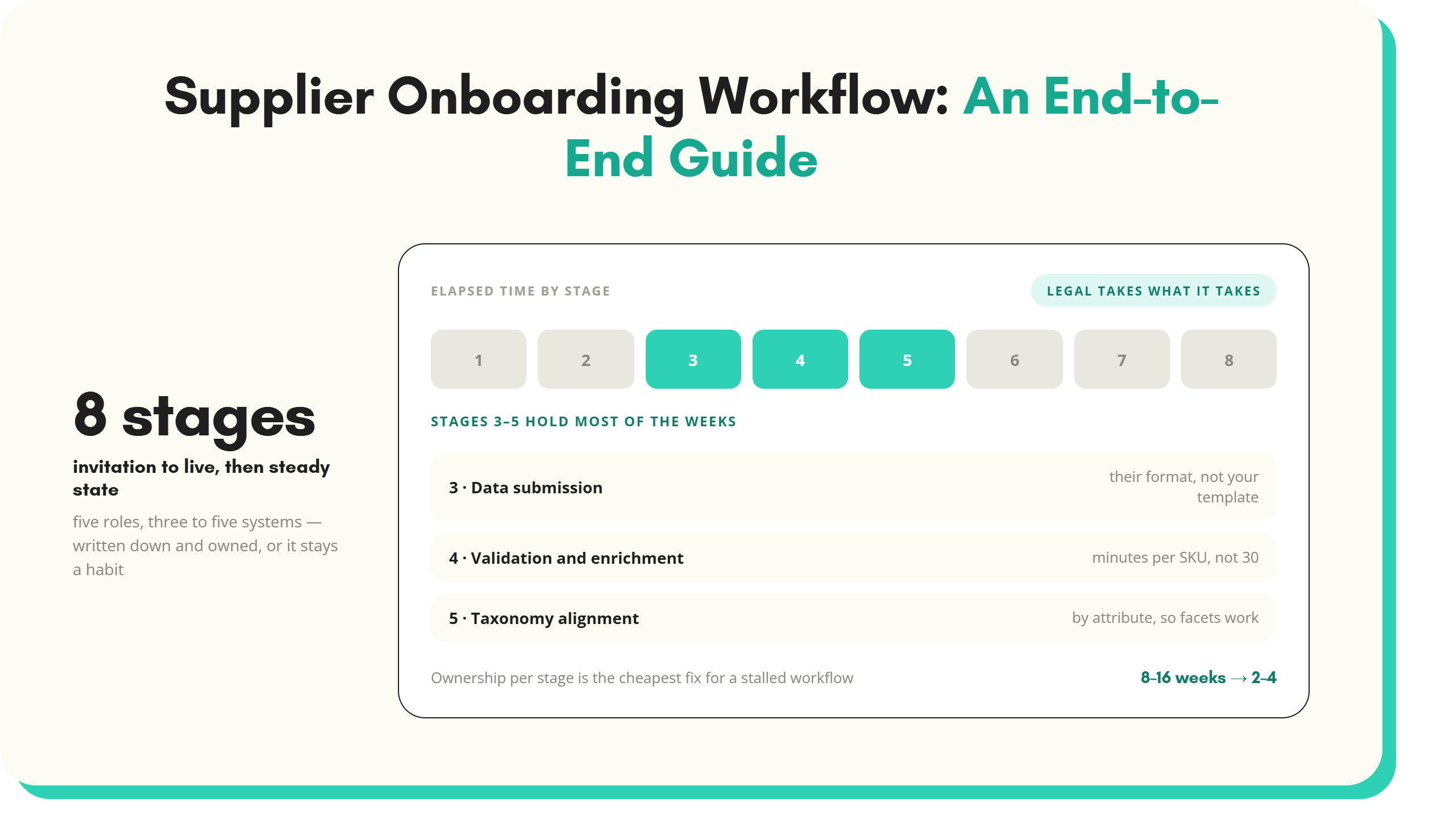
Traditional onboarding (manual data entry, spreadsheet templates, email back-and-forth) runs 8 to 16 weeks per supplier from invitation to live. AI-powered onboarding compresses that to 2 to 4 weeks.
The biggest savings sit at stages 3 to 5. Manual data entry of 5,000 SKUs at 30 minutes per SKU is 2,500 hours of work. Modern AI extraction and enrichment runs the same workload in days. Mole Valley Farmers enriched 35,000 SKUs in three weeks using this approach.
Stages 1, 2, and 7 don’t compress much. Legal review lasts what it lasts. However, those stages no longer hide behind a slow data stage.
Measuring the supplier onboarding workflow
Five KPIs are enough to run this properly.
- Time to first SKU live: days from supplier invitation to first product going live. Target: under 30 days for new suppliers, under 14 for repeat.
- Data completeness at activation: percentage of mandatory attributes populated at go-live. Target: above 95%. Below 80% means you’re publishing junk.
- Rework rate: percentage of records sent back for correction after the first submission. Target: under 15%.
- SKU throughput per analyst per day: how many SKUs one team member moves through enrichment and review. Manual: 50 to 100 per day. AI-assisted: 500 to 2,000.
- Onboarding cycle time: total elapsed days from stage 1 to stage 7. Target: 4 weeks or under for a 5,000 SKU supplier.
Measure these per supplier, not just at team level. Averages hide where one supplier is dragging the rest down. Tactical fixes are covered in how to onboard suppliers faster, and the portal-versus-email trade-off is set out on the supplier portal page.
A documented supplier onboarding workflow isn’t necessarily elaborate. Eight stages, five roles, three to five systems, five KPIs. However, it does have to be written down and owned. The supplier onboarding software then plugs into the framework rather than defining it.
Key takeaways
- A supplier onboarding workflow covers identity, commercial terms, data submission, enrichment, categorisation, and activation. Each with an owner.
- The eight-stage process moves a supplier from invitation to live, with ongoing management as the steady state.
- Stages 3 to 5 (submission, enrichment, categorisation) hold most of the elapsed time. AI tooling makes the biggest difference there.
- Five roles share the work: category manager, commercial manager, data manager, IT, supplier. Document ownership per stage.
- Five KPIs: time to first SKU live, completeness, rework rate, overall cycle time.
What’s next
If your supplier onboarding sits at 8 to 16 weeks per supplier and most of that time is at stages 3 to 5, SKULaunch handles the parts that compress with AI: extracting attributes, validating against your schema, classifying to ETIM or your own taxonomy, and pushing enriched records to your ecommerce storefront or your PIM. Book a session to see your own data run through.
See SKULaunch in action
Watch how we handle AI enrichment, supplier onboarding, and catalogue scale in a live 30-minute demo.

.avif)