

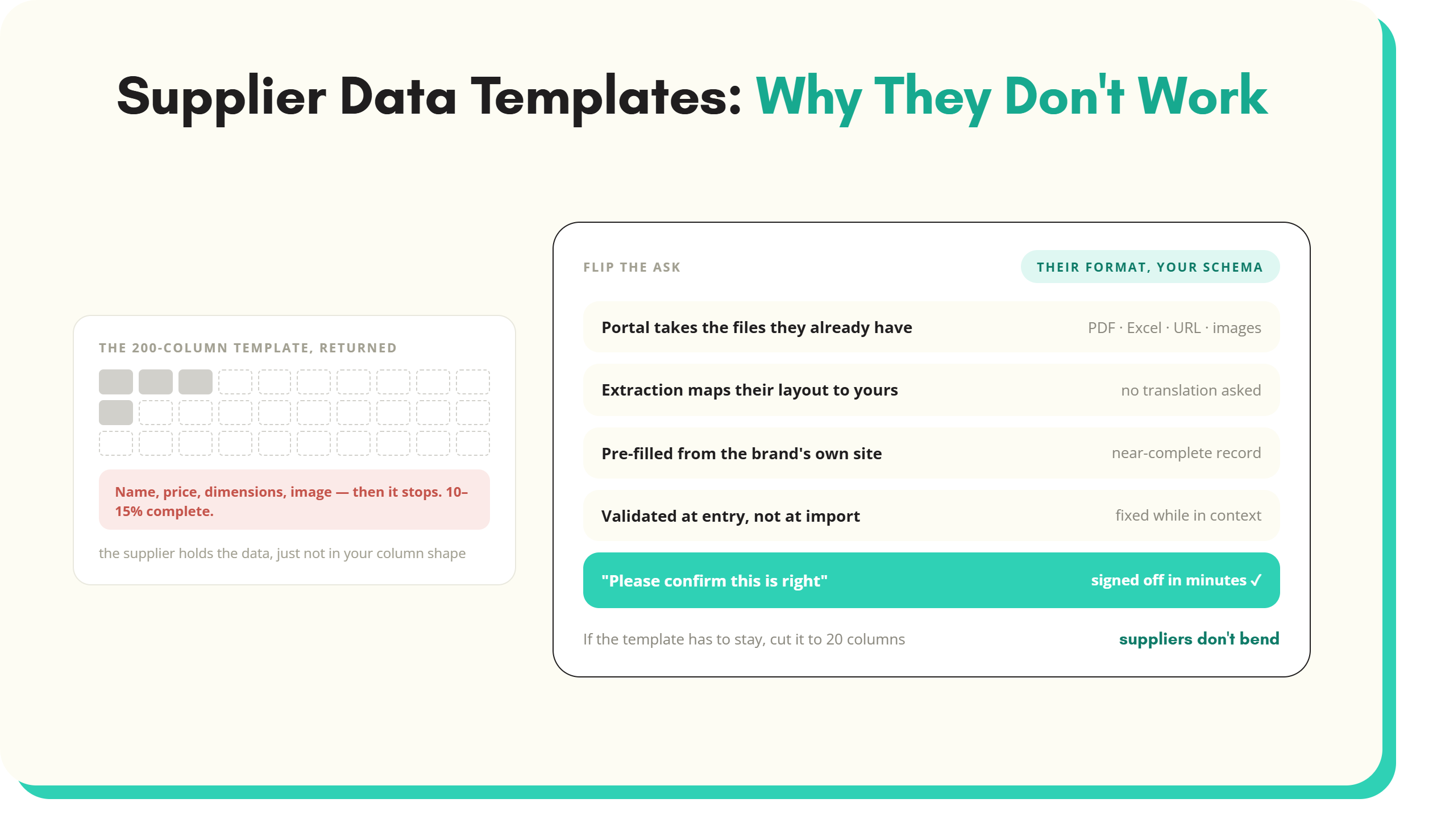
Supplier data templates are the default answer to onboarding product data at scale, and they almost always disappoint.
You’ve built a supplier data template before. It sat on a shared drive for six months, came back half empty, with three suppliers using their own column headings and one returning a PDF. Supplier data templates are the default answer to onboarding product data at scale, and they almost always disappoint. The reason is structural. Templates ask suppliers to bend their data to your shape, and suppliers do not bend.
This piece is for procurement and category managers who want to know why the template approach keeps failing, and what to do instead.
The supplier data template trap
Most procurement and data teams reach for a template because it looks like the cheapest fix. You list the attributes you need, you put them in columns, you send the spreadsheet to suppliers, and you wait. The cost looks like an hour of work and an email. The real cost shows up months later, in the SKUs that never went live and the suppliers who stopped replying.
Why retailers build them
The logic is sound on paper. If you tell suppliers exactly what data you need, in a standard shape, you save your category managers from chasing missing fields one by one. The template is meant to be self-service. Suppliers fill it in, you import it, the catalogue updates. One exchange, one source of truth.
Why suppliers cannot use them
Suppliers don’t hold their product data in your column structure. They hold it in their own ERP, their own product information management system, or, more often, in a folder of PDF datasheets and a single Excel file used by the sales team. To fill your supplier product data template, a supplier has to extract the data they have, transform it into your fields, and type it into your shape. For one retailer they sell to. They may well sell to twenty.
Completion rates barely move
In Start with Data’s consultancy work, completion rates on full supplier data templates with 100+ columns consistently sit at around 10 to 15%. Suppliers fill in name, price, dimensions, image, and stop. The fields you actually need to differentiate the catalogue, the structured attributes, the technical specifications, the compliance data, those are the fields suppliers skip. The template hasn’t failed because suppliers are unmotivated, but because the structure of the work is wrong.
The three reasons supplier data templates fail
Templates fail for three structural reasons, not because suppliers are lazy or because the template was badly designed.
1. Format mismatch between retailer and supplier systems
Your template expects "Length (mm)". Your supplier holds the data as "Length 250mm" in a free-text product description. Another supplier holds it as a separate "L" field in centimetres. A third has it in a PDF datasheet only. The data exists. It does not exist in the shape your template wants. Every supplier sends back a different mismatch and your data team spends the saved time on cleanup.
2. Variable column count across suppliers
A power tools brand needs 40 attributes: voltage, battery type, chuck size, torque, weight, runtime. A fastenings supplier needs 15: thread, length, head type, material, finish. A clothing brand needs different ones again: size, fit, fabric composition, care. A single template either has 200 columns to cover all of them, in which case the fastenings supplier sees a wall of irrelevance, or it has 20 generic columns, in which case the power tools brand cannot describe its products properly. There is no single column set that works for a broad supplier base.
3. No validation means bad data gets submitted
Spreadsheets do not enforce data types. A supplier types "200mm" into your Length field. Another types "around 200". A third types "200 (estimate)". Your import job sees three values where it expected three numbers. The import fails, the data manager fixes it by hand, and the saved time disappears. Validation that lives in the import script, not in the template itself, exposes problems long after the supplier has moved on.
What to do instead
For an approach that works, flip the assumption. Stop asking suppliers to translate their data into your shape. Take whatever they have, in whatever format, and translate it yourself.
1. Portal-based submission
Replace the email-the-template loop with a supplier portal that accepts the supplier’s actual files: their PDF datasheets, their internal Excel files, their product page URLs, their image folders. The format burden moves off the supplier. You get a single intake point you can audit and chase from.
2. AI mapping of whatever format suppliers send
Once the file is in, AI extraction reads the supplier’s actual layout and maps it to your attribute model. A PDF datasheet with a specifications table on page two becomes structured values. An Excel file with three product groupings on one tab becomes three normalised rows. The supplier does no translation work. Your system absorbs the variability.
3. Pre-fill from web research
For named brands, the supplier’s public website already holds most of the data. Pull product URLs from the brand’s site, have those scraped and structured into the catalogue, then send the supplier a near-complete record to confirm and sign off. Onboarding flips from "please fill this in" to "please confirm this is right". Suppliers approve quickly because the work has already been done.
4. Validation at entry
When data arrives, automated checks run against your attribute rules before the record is accepted:
- Voltage must be a number
- Material must be one of a known list
- SKU must not duplicate an existing record
- Errors surface at submission, not at import
The supplier sees the issue while they still have context to fix it. Putting product data quality checks at the entry point is what makes the rest of the workflow possible.
This pattern, intake plus extraction plus validation working together, is what modern supplier onboarding software built around. The template stops being the primary mechanism. It becomes, at best, a small fallback for the handful of suppliers who still want to submit a spreadsheet.
If you absolutely must have a supplier data template
If your governance, your IT department, or your existing process means you cannot retire the template tomorrow, here is how to make the one you currently use less destructive.
Keep it to 20 columns, not 200
Cut everything that is not essential for product setup. Name, SKU, brand, category, key technical attributes, image URL, price. That is the spine. The rest, the marketing description, the long copy, the SEO keywords, the alternative images, those come later through enrichment, not from the supplier. A 20-column template gets filled in. A 200-column template gets abandoned. If you want the short version as a file rather than the argument for it, the supplier new line form template is 18 fields, chosen because they are the only ones the supplier genuinely knows, with dropdown validation on unit of measure and currency.
Publish only what suppliers actually need to submit
Audit your current template. Most of the columns will be fields nobody uses, fields your team fills in after import, or fields derived from other fields. Strip those out. If a supplier opens the template and sees only the fields they can reasonably answer, they’ll complete them.
Offer the template as a lead magnet, not as your ingestion mechanism
Suppliers and category managers searching for “supplier data templates” online are doing your competitor research for you. A clean, opinionated 20-column template, offered as a free download in exchange for an email, gives the searcher what they came for and gives you a warm contact. Treat the template as marketing content. Treat the supplier portal as the real intake mechanism. The two jobs are not the same.
Key takeaways
- Supplier data templates fail because they require suppliers to translate their data into your column shape, and suppliers do not hold their data that way.
- Completion rates on full supplier product data templates with 100+ columns sit around 10 to 15% in practice, not because suppliers are unmotivated but because the structure asks too much of them.
- The three structural reasons templates fail are format mismatch, variable column count across suppliers, and no validation on submission.
- The pattern that works is portal-based intake, AI mapping of whatever format the supplier sends, pre-fill from web research, and validation at entry.
- If you cannot retire your template yet, cut it to 20 essential columns and treat the longer version as a lead magnet, not as operational ingestion.
For a wider view on the operational change behind this, see the guide to onboarding suppliers faster.
What next?
Are your supplier templates coming back half empty months after you sent them? Get in touch with us today at SKULaunch to book a 30-minute discovery call, and we will show you how to onboard suppliers using their data, not yours.
See it in practice: supplier product data templates built for each category, reuse column mappings for repeat supplier files and collect package dimensions and case pack data from suppliers.
See SKULaunch in action
Watch how we handle AI enrichment, supplier onboarding, and catalogue scale in a live 30-minute demo.


.avif)