

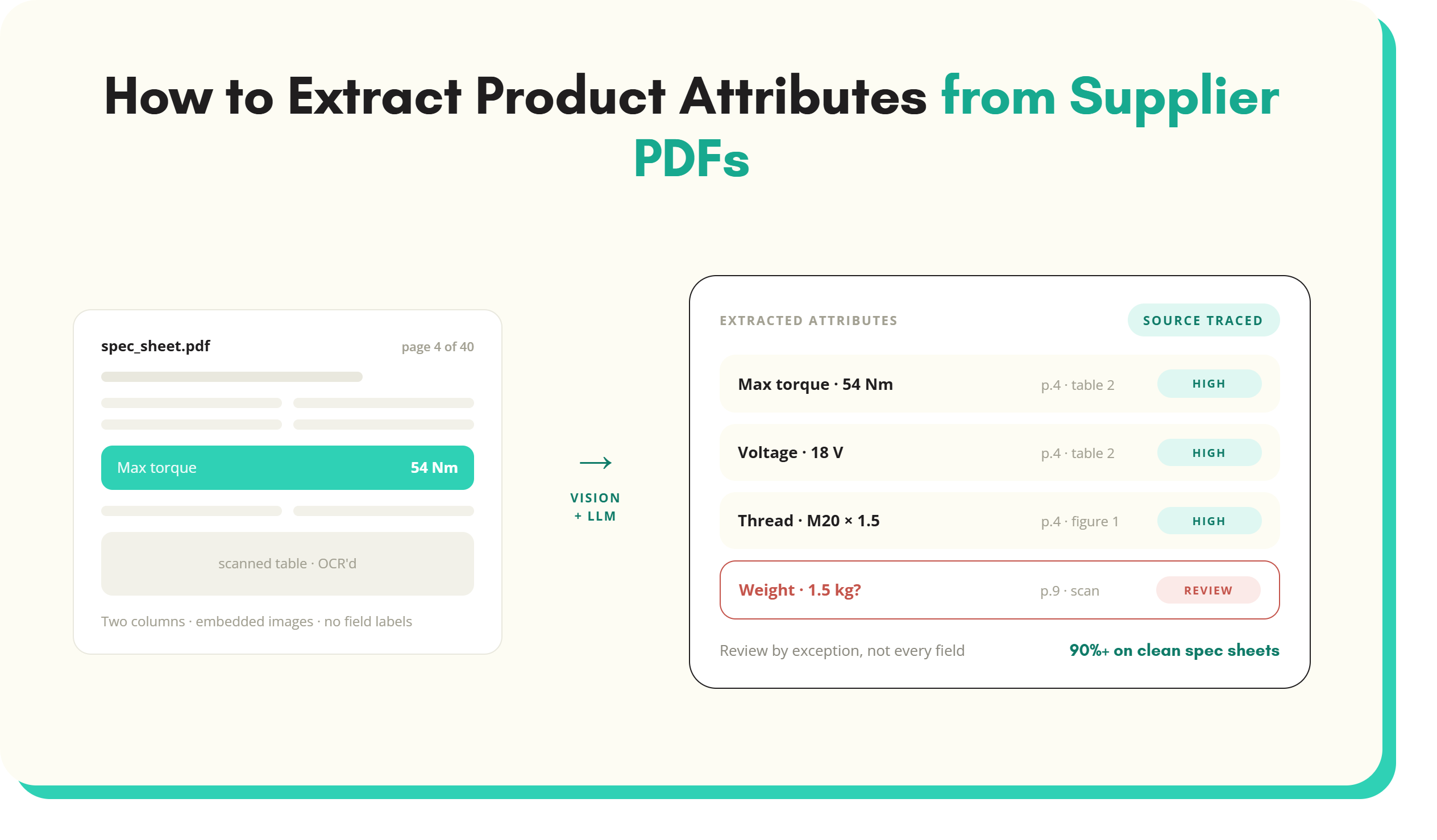
Supplier PDFs are the hardest format most product data teams deal with.
Supplier PDFs are the hardest format most product data teams deal with. A clean supplier spreadsheet takes minutes to process through any extraction pipeline. The same product information spread across a two-column spec sheet, rendered partly as embedded images with an inconsistent heading structure, breaks rules-based scripts silently and requires manual correction at scale. This article covers the technical reasons that PDF attribute extraction is difficult, the three main approaches available, and what accuracy to expect from each.
Why PDFs are hard to extract attributes from
PDFs were designed for display, not data extraction. That distinction matters more than people expect when building a supplier data pipeline.
1. Layout versus structure
A PDF stores content as positioned objects on a page, each with X and Y coordinates. The label “Voltage” and the value “240V AC” are two separate text elements with no link between them in the file format. Extracting the attribute correctly means inferring the label-value relationship from spatial position alone, and that inference fails the moment a supplier changes their page layout.
2. Images embedded as text
Many spec sheets and technical data books render content as rasterised[1] images, particularly scanned documents from older suppliers. A standard PDF text parser returns nothing from those sections. OCR must run before any extraction logic applies, and OCR introduces its own error rate on top of the format variation.
3. Inconsistent formatting across suppliers
Two suppliers selling the same product category will present their data in entirely different layouts: different column arrangements, different attribute names, different units, different table structures. Rules built for one supplier’s format break on the next. For a distributor with 200 active suppliers, the overhead for maintaining supplier-specific rules compounds rapidly.
4. Multi-product PDFs
Line cards and product catalogues contain dozens or hundreds of products in a single document, often with slightly different layouts per product entry. Before attribute extraction can begin, the system needs to correctly segment which attributes belong to which product. That segmentation step is a separate failure point that compounds with the extraction failure rate.
The three approaches to PDF attribute extraction
1. Rules-based extraction
Rules-based extraction uses pattern matching. You define rules: find the text “Weight”, extract the value that follows. It works when supplier formats are tightly controlled and change infrequently. Some large suppliers maintain structured technical documentation that holds its format reliably across product ranges and years.
It breaks when those conditions change. For instance:
- A new supplier
- A formatting update
- A new product category
Each of these require updated rules. Teams that scale a rules-based approach beyond a handful of suppliers typically end up maintaining hundreds of brittle rules, along with the engineering time to keep them current.
Rules-based extraction is the right choice for a narrow set of predictable inputs. It does not scale across a mixed supplier base.
2. OCR and regex
OCR converts image-based and scanned PDFs to machine-readable text, solving the embedded-image problem. Regular expressions then extract attribute patterns from that text.
The limitations are significant. OCR output is rarely clean:
- Column boundaries merge
- Values split across lines
- Units get misread
- Decimal points drop out
Running regex patterns over noisy OCR output means those patterns must also account for OCR error modes, not just format variation. False positives increase. Values look correct in the extracted output but contain errors that are hard to catch without manual review of every field.
This was the standard approach before AI vision models became viable and remains in use where document volumes are low and accuracy requirements are moderate.
3. AI vision models combined with language models
The modern approach to PDF attribute extraction combines AI vision models with large language models (LLMs). The vision model processes each PDF page as an image, reading layout, spatial relationships, and document structure directly. The LLM then extracts, normalises, and maps content to your target attribute schema.
This combination handles what the other two approaches cannot. A vision model:
- Distinguishes table headers from table cells
- Distinguishes product names from section headings
- Distinguishes specification rows from footnotes
- Reads multi-column layouts and nested tables correctly
The LLM normalisation layer maps synonym labels (“rated current”, “full-load amps”, “FLA”) to the same attribute, and parses compound values such as “M20 x 1.5” into separate fields.
The result is a system that handles format variation without needing per-supplier rule maintenance.
For a detailed comparison of how these approaches perform across supplier format types, see the full guide to AI vs rules-based attribute extraction.
What good AI extraction looks like
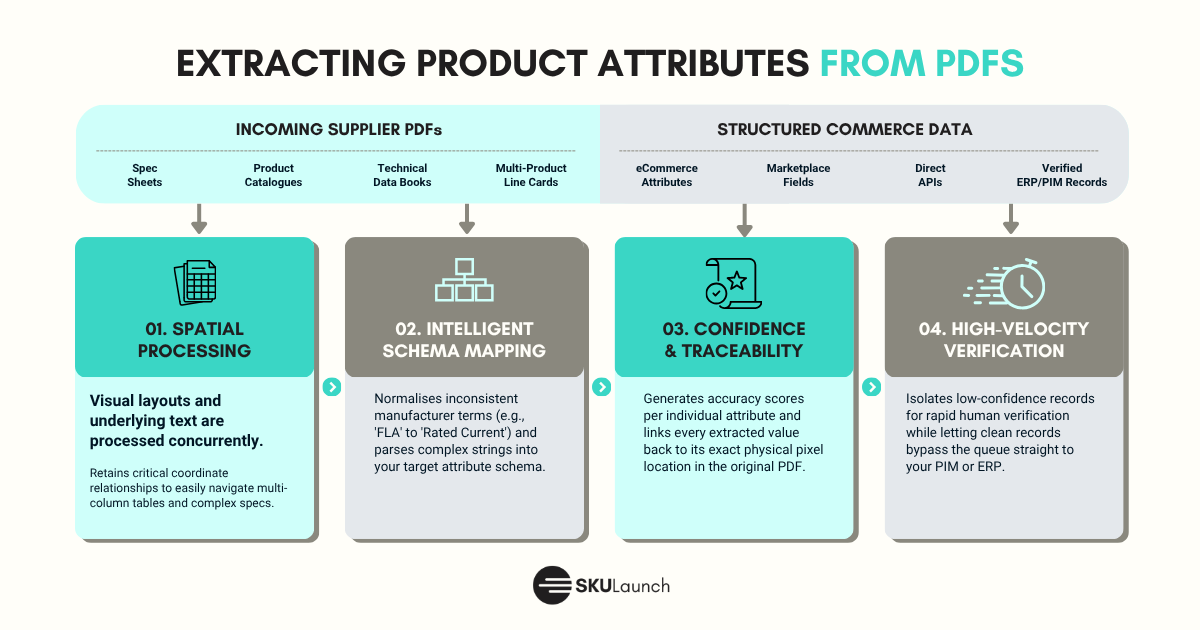
Not all AI-based PDF attribute extraction is equivalent. These are the capabilities that separate a production-ready system from a proof of concept.
Layout and text processed together
The model should read the visual layout and the underlying text in the same pass. Approaches that strip text first and then pass raw text to an LLM lose the spatial relationships that are only visible in the rendered page. For complex spec sheets with multi-column tables, that loss is significant.
Handles spec sheets, line cards, and multi-product catalogues
Single-product spec sheets are the easy case. A platform that handles spec sheets but fails on multi-product line cards covers only part of the typical supplier document mix. Verify that the system handles your most complex document types, not just the cleanest ones.
Confidence scoring per attribute
Every extracted value should carry a confidence score. This is what makes human review tractable at scale. A system that returns all extracted values without confidence scoring forces reviewers to check everything. One with reliable confidence scores lets a reviewer focus on the small percentage of values that actually need attention.
Source traceability
Each extracted value should link back to its source location in the original document. When a reviewer questions a value, they should be able to see exactly where in the PDF it came from. Without this verification, quality control is guesswork. SKULaunch’s AI product data extraction platform surfaces source location alongside every extracted attribute, so reviewers can verify at the record level rather than re-processing the whole document.
Accuracy expectations for PDF attribute extraction
Accuracy varies considerably by input type. These are realistic benchmarks for a well-implemented AI extraction system.
- 90% or above on clean spec sheets
Single-product spec sheets with consistent formatting, selectable text, and clear attribute labels are the best-case input. The remaining error rate on these documents is typically edge cases: non-standard units, ambiguous labels, or values that span multiple lines.
- 70 to 85% on complex multi-product PDFs
Line cards and multi-product catalogues introduce segmentation uncertainty. Errors at the segmentation stage, identifying which attributes belong to which product, propagate downstream as extraction errors. Accuracy in this range is realistic and operationally useful. Claims of 90%+ accuracy on complex multi-product documents should be verified against your own document types before you rely on them.
Human review fills the remaining gap
No extraction system removes the need for review entirely. The goal is to concentrate review on the cases that need it. With confidence scoring in place, a team processing several hundred new supplier PDFs per month typically reviews a fraction of extracted attributes rather than checking every value.
It is worth noting that manual extraction is not a perfect baseline. A data entry operator working from a complex technical spec sheet introduces errors too, and those errors are not scored or traceable. The meaningful comparison is AI extraction plus targeted review against manual entry plus full-batch review. For a more in-depth look at how to benchmark extraction accuracy across formats, see the guide to product data extraction accuracy.
How to evaluate a PDF extraction tool in practice
The most effective evaluation step is testing a platform against your own supplier documents. Vendor-curated demos are not a reliable proxy for real-world performance.
What test data to use
- Pull 20 to 30 real supplier PDFs: a spread of clean spec sheets, scanned documents, and several multi-product line cards
- Include PDFs from suppliers where your data quality has historically been worst
These are the documents that reveal capability gaps. The clean spec sheets will look acceptable on almost any platform.
What to measure
For each extracted attribute:
- Compare the result against a manually verified baseline
- Measure precision (are the extracted values correct?)
- Measure recall (are all expected attributes present?)
- Report both figures separately for clean spec sheets and complex multi-product documents
- Ask the vendor for confidence score data
- Check whether high-confidence extractions are measurably more accurate than low-confidence ones
What the full workflow should look like
Extraction is one step in a pipeline. A production-ready platform:
- Surfaces low-confidence attributes for human review
- Shows the source location for each value
- and pushes enriched records to a PIM or commerce platform once approved
Evaluate the full workflow, not only the raw extraction step.
Red flags
- Accuracy numbers presented without a description of the test dataset
- Demos that only use clean, single-product spec sheets
- No source traceability
- No confidence scoring
- A system that requires new rules or configuration per supplier rather than handling format variation automatically
For an overview of how AI extraction handles all supplier formats, not just PDFs, see the AI product data extraction overview.
Key takeaways
- PDFs store content as positioned objects, not structured data. That is why simple parsing and pattern matching fail when supplier layouts change.
- Rules-based extraction and OCR-regex both break at scale across a mixed supplier base. AI vision-plus-LLM extraction handles format variation without per-supplier rule maintenance.
- Expect 90%+ accuracy on clean spec sheets. Expect 70 to 85% on complex multi-product PDFs from a well-implemented system.
- Confidence scoring and source traceability are what make a system work in production. Without them, human review at scale is unmanageable.
- Test any platform against your own most complex supplier documents. Curated demos are not a reliable proxy for real-world performance.
Try PDF extraction on your supplier data
SKULaunch processes supplier PDFs directly, extracts structured product attributes, and pushes enriched records to your PIM or commerce platform. Book a demo to see it working on your own documents.
To understand the full scope of what AI extraction covers across supplier formats, see the AI product data extraction overview.
See SKULaunch in action
Watch how we handle AI enrichment, supplier onboarding, and catalogue scale in a live 30-minute demo.


.avif)