

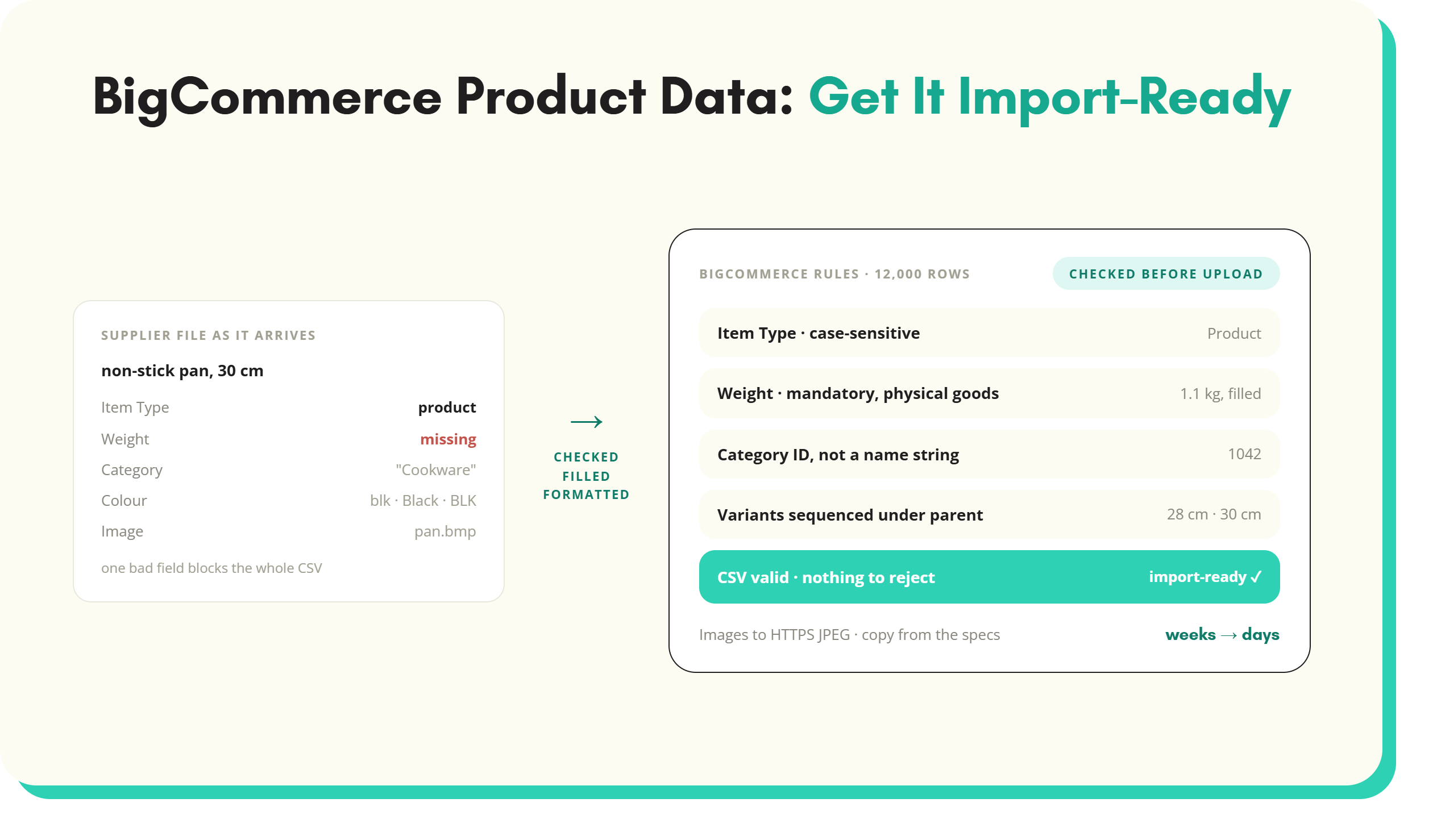
BigCommerce product data is where a lot of otherwise well-built replatforms stall.
BigCommerce product data is where a lot of otherwise well-built replatforms stall. BigCommerce itself offers advanced storefront design, strong integrations, and the flexibility to run multiple stores from one hub. None of that compensates for supplier data that is incomplete, inconsistent, or poorly formatted. Search filters, recommendations, and the customer's decision to buy all depend on the same underlying records.
Why BigCommerce product data breaks during onboarding
For most merchants, the real challenge is not BigCommerce itself. It is what happens to data before it gets there. Supplier files are usually built for wholesale, not for consumer sales, so they tend to include only SKUs, trade prices, and minimal descriptions. Fields BigCommerce actually needs, such as dimensions, category ID, or item type, are often missing entirely.
A PIM is built to store and distribute product information, but it generally assumes the data coming in is already clean. Most suppliers do not provide data that is BigCommerce-ready. Gaps such as missing weights, unsupported image formats, and variant errors pass straight through an unconfigured or underused PIM and reach the platform unchanged.
BigCommerce imports are precise by design. CSV files need correct headers, case-sensitive item types, valid category IDs, and variant rows sequenced directly under their parent product. When product data is flawed anywhere in that chain, imports fail and products can end up miscategorised even when the import technically succeeds.
Take a hypothetical homeware retailer attempting to upload 12,000 SKUs. If weight data is missing across a meaningful share of the catalogue, a physical-goods import will fail outright, since weight is a mandatory field. The fix is not one afternoon of spreadsheet work. It is tracking down the missing figure for every affected SKU, one supplier email at a time.
What BigCommerce actually requires from product data
Bulk uploads run through CSV, and BigCommerce blocks the entire file over even small errors. Every new product needs, at minimum, an Item Type, Product Name, Price, and Weight for physical goods. Missing weight is one of the most common causes of a failed import. Files are capped at roughly 20 MB and around 10,000 SKUs per batch. Item Type values such as Product, Variant, Image, and Video are case-sensitive and must match exactly. Product ID has to stay blank for new products, since using an existing ID overwrites that record. A product can carry up to 600 variants, but each variant row must follow directly after its parent product's row to group correctly. Images need to be JPEG, PNG, GIF, or WebP, hosted on a secure HTTPS URL and under 8 MB. Zoom works best around 1280 by 1280 pixels. Categories must be mapped to a valid Category ID rather than a name string.
Beyond the technical minimum, BigCommerce rewards complete content. Detailed, customer-focused descriptions and multiple high-quality images with descriptive alt text both matter here. So do categories built on properly structured custom fields, which support this kind of product data enrichment. The BigCommerce product import template has the columns already laid out, with the case-sensitive Item Type values and the parent-then-variant row order built in.
Beyond compliance: what makes a BigCommerce product page succeed
Meeting BigCommerce's CSV rules gets a product listed, but it does not make the page persuasive. Titles work harder when they include brand, product type, and defining attributes. "Women's waterproof hiking boots, size 6" gives a shopper more to act on than "Boots" alone. Descriptions convert better when they lead with a benefit rather than a spec. "Stainless steel for durability and easy cleaning" says more than "made from stainless steel," even though both describe the same material.
Multiple angles and lifestyle shots, kept consistent in size and resolution across the catalogue, make a storefront look considered rather than thrown together. Complete specifications, particularly dimensions, weight, and compatibility, reduce the hesitation that leads to abandoned carts. They also cut down on the returns that follow when a product does not match expectations. Stock and price data need to stay current too. A listing that shows an out-of-stock item as available is one of the fastest ways to lose customer trust.
How SKULaunch structures BigCommerce product data
Supplier data arrives in whatever shape a given vendor happens to use. One spreadsheet has minimal descriptions, one CSV is missing weights, one feed carries images in a format BigCommerce will not accept. Reconciling all of that by hand before it reaches BigCommerce is exactly the kind of work that eats a team's week without building anything.
SKULaunch works as a supplier onboarding platform that handles that reconciliation before data reaches BigCommerce. Its core functions:
Data aggregation consolidates files from multiple suppliers, regardless of format, into a single workspace.
Attribute normalisation resolves inconsistent terms such as "blk," "Black," and "BLK" into one standardised value aligned with BigCommerce's filters and search.
Data enrichment identifies and fills missing attributes such as weight, dimensions, or material, using AI product data extraction and reference data.
Validation applies BigCommerce's own CSV rules before upload, checking item types, category IDs, and variant structures for compliance while errors are still cheap to fix.
Export flexibility generates BigCommerce-compliant CSV files, or produces an API-ready data feed for merchants set up to push data directly.
A typical BigCommerce product data workflow
The process runs as a sequence. Supplier files are gathered in whatever format they arrive, with no pre-formatting required. SKULaunch consolidates them into one workspace, then cleanses the data: correcting formatting errors, normalising attribute naming, and converting inconsistent units such as grams to kilograms.
Enrichment follows, filling in missing attributes like dimensions or weight, adding category IDs and variant rules, and drafting SEO-ready titles and descriptions. A generic supplier listing such as "Non-stick pan, 30 cm" can become "Professional non-stick frying pan, 30 cm, even heat distribution." A proper category ID and cleaned-up imagery get attached instead of a placeholder. Validation then checks every field against BigCommerce's requirements, including item type values, case sensitivity, image rules, and category IDs. Anything that would fail on import gets flagged first. The final step generates a BigCommerce-compliant CSV or API feed.
Consider a hypothetical consumer electronics distributor with 25,000 SKUs due for a seasonal promotion. Supplier files record weight in a mix of grams and kilograms, and many rows are missing category IDs entirely. Manually reconciling that at scale before a fixed promotion date is not realistic. Running the same files through a structured workflow means the units get standardised and the missing fields get filled. The catalogue is validated before a single row reaches BigCommerce, rather than after a failed import has already cost a day of the promotion window.
What better BigCommerce product data looks like in practice
When product data is cleansed, enriched, and validated before it reaches BigCommerce, the effects show up well beyond the import screen.
New products and seasonal lines can go live in days rather than weeks. The bulk of the preparation work no longer depends on a person working through it by hand.
Import failures become the exception rather than routine, because problems are caught during validation instead of surfacing as a rejected upload partway through a launch.
Product pages carry complete specifications and consistently mapped categories, which cuts down on the kind of mismatched expectations that drive returns.
Enriched titles, descriptions, and alt text give both BigCommerce search and Google Shopping more to work with, supporting visibility rather than leaving it to chance.
Catalogue refreshes, whether seasonal or supplier-driven, follow the same repeatable process each time, rather than repeating the same manual cleanup on a fixed schedule.
Key takeaways
BigCommerce product data problems rarely originate on BigCommerce. They start with supplier files that were never built for the platform's rules, and pass through a PIM that assumes the data was already clean. Meeting BigCommerce's technical requirements, mandatory fields, valid category IDs, correctly sequenced variants, is the baseline. Complete, enriched, well-structured data is what actually makes a catalogue perform. A structured product data enrichment process, handled through a platform built for the job, replaces the cycle of failed imports and manual rework. What's left is something repeatable. Merchants weighing up the same problem on a different platform may find the Shopify product data guide useful too.
To see how SKULaunch handles a real BigCommerce catalogue, request a demo.
See it in practice: product variants, bulk import tens of thousands of SKUs in one file and send different attributes to different channels.
See SKULaunch in action
Watch how we handle AI enrichment, supplier onboarding, and catalogue scale in a live 30-minute demo.


.avif)