

Shopify gives you a product model built around five core fields and a flexible metafields layer.
Shopify gives you a product model built around five core fields and a flexible metafields layer. It works fine for a 200-SKU fashion brand, but it falls apart if you have 50,000 technical SKUs, three suppliers each sending a different spreadsheet, and a head merchant trying to launch new lines by the end of the week. Product data enrichment for Shopify is the work that turns raw supplier data into a catalogue that searches well, filters cleanly, and reads consistently across thousands of products. Most of it has to happen outside the Shopify admin UI.
The Shopify product data problem
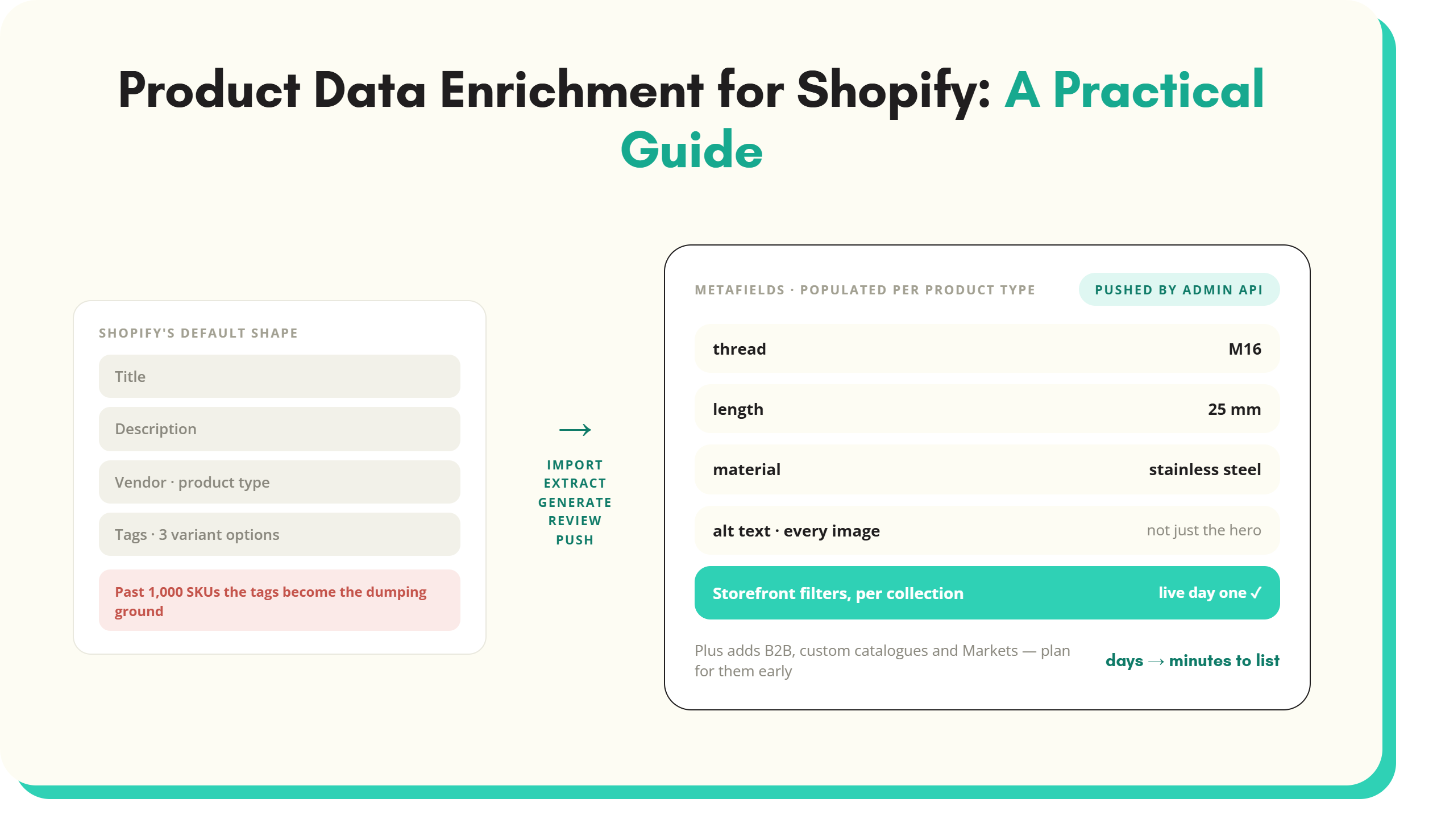
Shopify's default product schema is short: the title, body HTML (the description), vendor, product type, and tags. Add product options, up to three, and variants underneath. That is most of the shape. Metafields exist as a structured attribute layer, but they are not required, and most merchants meet them only when an app or a theme asks for them.
Past 1,000 SKUs, the cracks show. Tags become a dumping ground for anything that doesn’t fit the five fields. Vendor is one flat field, not a hierarchy of brand and supplier. Variant options max out at three, so a fastener with size, length, material, finish, and certification needs creative workarounds. Internal search matches on title and tags, not structured attributes, which means a customer filtering by 'stainless steel, M16, 25mm' gets nothing useful unless someone has stuffed those values into the product title.
Metafields fix the structure problem. Each one defines a typed attribute and exposes it to the storefront, the API, and Shopify Search. Storefront filters in collection pages are driven by metafield definitions, on Shopify Plus directly and on standard plans through the Search and Discovery app. The catch is they don’t fill themselves. The definition is the schema. The data underneath, a value per product, is what product data enrichment actually delivers.
What good enrichment looks like on Shopify
Good enrichment on Shopify shows up in four places:
- The metafield layer
- The product copy
- The storefront filters
- The image data
Structured metafields cover every attribute customers filter by. For a hardware retailer that means dimensions, materials, certifications, compatibility, and threading. For a furniture brand it means dimensions, materials, finish, assembly status, and weight capacity. The point is consistency: They are defined once, populated for every relevant product, and reuse the same values. A product is 'oak', not 'Oak' on one row and 'solid oak' on another.
Titles and descriptions follow a pattern. Same word order, same level of detail, same SEO structure across the catalogue. A customer comparing two similar products should not have to translate between writing styles. AI-driven content generation produces this consistency more reliably than five merchandisers writing in five voices.
Storefront filters are category-aware. For instance:
- A power tools collection filters by voltage, battery type, and tool category
- A fasteners collection filters by thread, length, and material
The filter set is different per collection because the relevant attributes are different per category, which is what metafield definitions assigned per product type are for.
Alt text and image metadata are populated for every image, not just the hero shot. Accessibility, image search, and AI shopping agents all read this layer. An empty alt text is a missed opportunity in three channels at once.
Four ways to enrich a Shopify catalogue
There are four routes most Shopify merchants take, with different break points by SKU count and team size. For a side-by-side view of the wider market, see the breakdown of product data enrichment tools.
Manual editing
Works fine for a 200 SKU brand where the merchandiser knows every product. Stops working past 500 SKUs. Falls apart completely past a few thousand. The bottleneck is not typing speed, it is consistency. Five merchandisers writing descriptions over six months produce five different voices. Audit the catalogue later and you will find products with empty metafields, products with values entered in the wrong field, and inconsistent product descriptions. If the work is going to happen in a spreadsheet regardless, the Shopify product CSV template at least enforces the Handle grouping and the field formats Shopify rejects without telling you why.
Shopify apps
Several apps tackle slices of the problem. Matrixify handles bulk import and export with metafield support. Bulk Product Edit and similar tools update many products in one operation. Shopify Magic generates product descriptions natively, and the third-party AI description market is large. None of these apps alone can ingest a supplier PDF, extract a hundred attributes per product, classify to a taxonomy, validate against your rules, and write channel-specific descriptions. You end up running three apps and still doing manual work in between.
External enrichment platforms pushing to Shopify
Standalone enrichment platforms ingest supplier data in any shape, build the structured record, then push it to Shopify via the Admin API. The data lives outside Shopify and Shopify becomes one destination among several. This is how most distributors with technical catalogues over 5,000 SKUs handle it, as Shopify is rarely the only place the data needs to land.
Direct API integration with an enrichment pipeline
Teams with engineering capacity sometimes build their own pipeline reading from suppliers, running extraction and classification, and writing to Shopify via the Admin API and metafield endpoints. It’s doable, but the cost is real: building the AI extraction layer, maintaining the taxonomy, and handling the long tail of supplier file formats. Most teams that start this build switch to a platform within 18 months once they realise that extraction accuracy and taxonomy maintenance are ongoing factors, not one-off projects.
A practical Shopify enrichment workflow
Five steps describe what a working enrichment workflow looks like, whether you build it yourself or use a platform like SKULaunch.
- Import. Pull supplier data in whatever form it arrives: PDF spec sheets, Excel files, supplier portals, web pages, images of product labels. No template enforcement. You accept what suppliers send because the alternative (sending a template back) has a completion rate that hovers around 12% in most distributor projects, and the suppliers who send poor data are usually the ones with long-tail SKUs you most need.
- Extract. Read every source and pull out the attributes. Vision models read PDFs, structured parsers read spreadsheets, language models read long-form copy. The output of AI extraction is a normalised attribute set per SKU, with confidence scores so you know which extractions to trust automatically and which to send for human review.
- Generate. Write product titles, descriptions, and bullet copy from the extracted attributes, plus a brand voice guide. Channel-specific variants where needed: a Shopify storefront description, an Amazon listing version, a B2B trade catalogue description. Generating from one source keeps the catalogue consistent across destinations.
- Review. A merchandiser approves before anything goes live. Confidence scores from extraction highlight the SKUs that need attention; the rest flow through with light-touch review. This is the step most in-house builds underestimate.
- Push to Shopify. Map the attributes to metafield definitions, push titles and descriptions to product fields, push images and alt text, set product type and tags. SKULaunch's Shopify integration uses the Admin API and metafield bulk operations to handle volume. New SKUs go live with the structured layer already populated, so storefront filters work from day one.
What changes for Shopify Plus
Shopify Plus adds three capabilities that multiply the enrichment workload: B2B catalogues, custom catalogues, and Shopify Markets.
B2B capabilities
Plus B2B adds trade pricing, payment terms, quantity breaks, and customer-specific catalogues. Product data has to support both DTC and B2B audiences, often with two description fields per product, two image sets, and B2B-only attributes such as case quantities, MOQs, lead times, and freight class. Plan for these from the start; retrofitting B2B fields onto an existing catalogue is a project in its own right.
Custom catalogues
A Plus merchant might run 12 different custom catalogues for 12 reseller groups. Each needs its own product visibility, pricing, and sometimes its own descriptions. Manual maintenance of 12 catalogues is unworkable. Data needs to be generated from a single source and projected into the relevant catalogues, which is where having an enrichment platform outside Shopify pays back.
Market-specific product data
Shopify Markets serves different content per country or region. That is not just translation. It is localised compliance text, region-specific certifications (UKCA vs CE vs UL), different size standards, different units, and sometimes different product images for regional packaging. Markets-driven enrichment generates multiple regional versions of attributes and copy from one source record.
Measuring the impact of Shopify product data enrichment
The three metrics worth tracking are:
- Conversion rate
- Search performance (Shopify and Google)
- Time to list
All are measurable in Shopify analytics or Google Search Console.
Conversion rate on enriched vs non-enriched products
Tag products by enrichment state and compare in Shopify analytics. A populated metafield set, a properly written description, and clean image alt text usually lifts product page conversion. The exact lift depends on the catalogue, but a measurable difference is the bar.
Internal Shopify search performance
Look at the search-no-result rate and zero-click search sessions in the search analytics. Filterable attributes in metafields reduce both. A customer who can filter by voltage and battery type does not bounce as often as one who has to scroll 30 listings to find the right tool.
Google search performance
Structured product data, metafields exposed through product schema, and well-written descriptions all contribute to ranking and rich result eligibility. Track impressions and clicks per product page in Search Console; pay attention to long-tail technical queries, which is where the structured data shows up most.
Time to list new SKUs
Measure end to end, from when a supplier file is received to when the product goes live on the storefront. A common pattern after deploying enrichment automation is moving from days per product to minutes, similar to the path Mole Valley Farmers took when they enriched 35,000 SKUs in three weeks. The freed-up time goes into launching more SKUs rather than reducing headcount.
Key takeaways
- Shopify's default product model handles small catalogues; metafields are the structured layer for anything larger.
- Manual editing breaks past a few hundred SKUs because consistency, not typing speed, is the bottleneck.
- The four enrichment routes are manual editing, Shopify apps, external platforms, and direct API. Most catalogues over 5,000 SKUs end up on an external platform.
- A repeatable workflow runs import, extract, generate, review, push. The same five steps apply whether you build it or buy it.
- Shopify Plus multiplies the load with B2B, custom catalogues, and Markets. Plan for this factor from the start.
- Conversion rate, search performance, and time to list are the metrics which show return on the work.
Where to go next
The patterns above apply to any catalogue over a thousand SKUs. For the discipline beyond Shopify and how it sits alongside PIM, taxonomy, and supplier onboarding, see the wider overview of product data enrichment. If the store also needs a system of record, PIM for Shopify covers one record per product, variants mapped to Shopify options and metafields filled from supplier data.
Is your Shopify catalogue stuck on empty metafields? Book a Shopify enrichment demo and we will take one of your supplier files and show it landing as populated metafields, working filters, and clean PDP copy in your dev store.
See SKULaunch in action
Watch how we handle AI enrichment, supplier onboarding, and catalogue scale in a live 30-minute demo.

.avif)